
In recent years, no-code and low-code development has emerged as a game-changer for custom web app development services, empowering even non-tech users to build applications. Compared to traditional software development, this innovative approach offers a faster, more flexible solution that significantly reduces the overall IT outsourcing cost by minimising the need for large teams. In this article, we will delve into the differences between no-code and low-code, recommend top tools, and share practical use cases to help you choose the right path for your next project.
What is Low-code?
The term “Low-Code” refers to a modern software development approach that significantly reduces the reliance on extensive manual programming.
Traditionally, developers had to write every line of code from scratch. With low-code, it is possible to accelerate the process using visual interfaces, drag-and-drop functionality, and pre-built components, while still allowing developers to write custom scripts for complex business logic.
While low-code platforms make it easier for non-tech domain experts to collaborate, they are most powerful in the hands of experienced custom web app development services. By utilising these tools, an outsourcing team can build scalable, highly customised applications much faster than traditional methods, ensuring both top-tier quality and efficiency for your business.
What is No-code?
No-Code refers to methods and platforms that enable the development and construction of applications and software without programming knowledge or skills.
With no-code, you can create applications without relying on programming at all, using visual interfaces, drag-and-drop interactions, configuration panels, and more.
Low-code vs No-code
There are some differences between low-code and no-code:
|
Creteria |
Low-code |
No-code |
| Requirement for Development Skills | Require certain programming skills | Applications can be developed using visual tools and drag-and-drop operations, so no programming skills are required. |
| Flexibility and Customisation | Highly customizable and complex logic can be implemented | Limit flexibility due to the use of pre-built features and components |
| Development Speed and Productivity | Development time can be longer than no-code due to high customisation and complex requirements | Speed up development by providing a visual development environment |
| Functionality and Scalability | Able to implement specific requirements and advanced features | Limit default features and components that may not meet some requirements |
| Security and Compliance | Secure applications can be developed by programming | Different levels depending on the platform |
| Team Collaboration | Facilitate collaboration effects between technical teams, such as developers and engineers | Accessible to non-engineers, making it easier for the whole team to participate and collaborate |
| Maintenance and Support | Relatively easy to modify and update custom code by leveraging programming | Often dependent on platform-provided updates and support |
| Scalability | Complex requirements and functional extensions may be accommodated | Good for simple applications and small projects, but may have limitations for large projects and high-load processing |
The above comparison is only general and may vary depending on the actual project and requirements. Considering project goals, team skill sets, budgets, the complexity of requirements, etc., it is important for any custom web app development services to holistically evaluate the advantages and limitations of no-code and low-code.
Introducing Low-code and No-code tools
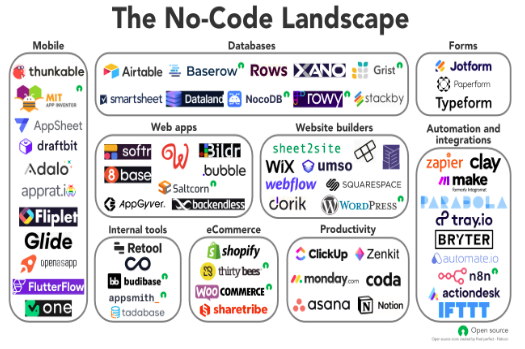
There are many no-code and low-code tools available on the market. Below are some popular no-code and low-code tools.
No-code tools
- Bubble: A no-code platform for visually building web applications. You can quickly create features such as databases, workflows, and user accounts.
- Adalo: A no-code platform for visually creating mobile applications. You can develop an app by combining elements such as design, database, and user actions.
- Airtable: A no-code platform that combines the functionality of spreadsheets and databases. Create your own data model to easily manage and share data.
Low-code tools
- OutSystems: An enterprise-grade, low-code platform to help develop web and mobile applications. It provides features such as visual modelling, database manipulation, and automation.
- Mendix: A low-code platform dedicated to developing business applications. A combination of visual modelling and coding enables the creation of sophisticated applications.
- Microsoft Power Apps: Microsoft’s low-code platform to support web and mobile application development. It has a visual interface and a data linkage function.
While the platforms listed above are popular among custom web app development services, they represent only a fraction of the market. Therefore, choosing the right tool requires a careful evaluation of your project’s requirements, long-term goals, budget, and available skill sets.
Recommended free No-code apps
System development No-code
Amazon Honeycode
Amazon Honeycode is an example of a no-code application provided by Amazon. It is specifically designed for business system development, offering functionalities such as CRM tools for managing customer information, shift management, to-do lists, and more.
One notable advantage of Amazon Honeycode is that it allows free usage for up to 20 users. This makes it an ideal choice for developing systems intended for small companies or departments within larger organisations.
Glide
Glide is a no-code application that was acquired by Google in 2020. It stands out for its ability to automatically generate systems and applications by importing Google spreadsheets. Once imported, users have access to a wide range of templates and components to customise and develop software according to their preferences.
One notable feature of Glide is the seamless synchronisation between the database spreadsheet and the software created. This makes it particularly convenient for companies that regularly use spreadsheets, as it simplifies the adoption process. Additionally, employees are likely to be more receptive to the new system due to their familiarity with spreadsheets.
While Glide offers a paid plan, it also provides a free plan that allows users to start using the platform immediately after registering.
PowerApps
PowerApps is a no-code application by Microsoft familiar with Excel, etc. You can develop a system with the same feeling as creating Excel functions and materials with PowerPoint. Those familiar with Microsoft products will find it relatively easy to use.
PowerApps can be developed efficiently by selecting the one that matches the image of the finished product from the templates. It is also used by many custom web app development services in the development of systems related to domestic administrative procedures for the purpose of shortening the development period.
There are costs associated with subscriptions, etc., but the trial version is free. If you want to experience the feeling of using a no-code app, it’s a good idea to try it out.
Top 5 website development No-code platforms
STUDIO
STUDIO Co., Ltd., a Japanese company, has developed a no-code application that enables website development directly from a web browser. Unlike many existing no-code apps, which are primarily offered by overseas companies, STUDIO stands out as a user-friendly option for those who may not be proficient in English or prefer natural Japanese translations.
STUDIO offers flexible design capabilities and allows collaboration among multiple users during the development process. The free plan, which has no time limit, provides access to essential features without any limitations or issues. This makes it a convenient choice for individuals looking to create websites without the need for coding expertise.
Shopify No-code
Shopify is a famous platform where anyone can create an EC site.
An EC site requires various elements such as product pages and payment functions, but Shopify makes it very easy to build them. The flexibility of the design is high, and it is possible to create a site that is perfect for the image of your company’s products and services. Although the free period is limited, it is a good idea to register as a trial because it has great advantages in terms of name recognition and reliability.
Webflow
Webflow is a no-code application that allows you to build a highly-designed website with simple operations. The feature is that websites published by creators around the world can be reused like templates. You can develop a website with originality just by editing the template for your company. Even if you are not confident in your knowledge and sense, you will be able to build a high-quality website in a short time.
Webflow has a free plan as a starter plan in addition to a paid plan that incurs a monthly fee.
Peraichi
Peraichi is a no-code application that allows you to easily create a website by selecting a template and inserting images and text. You can implement the functions necessary for management, including payment, reservations, and e-mail magazines. It is especially suitable for creating websites for small store businesses such as restaurants and salons.
Seminars are held to explain effective usage methods, so you can rest assured even after the operation starts. The free plan has restrictions on functions and duration, but it is a no-code app that is perfect for those who want to create a website quickly and easily.
The 5 best No-code app builders
AppSheet
AppSheet is a platform for developing business applications with no code. Acquired by Google and already used by major companies, it is expected to gain more and more attention.
AppSheet can create a database from Google Sheets, Excel, etc. Prototypes are created automatically after importing data, so application development can proceed smoothly. Another feature is that there are many sample applications. It is also a good idea to register for the free plan and check if there are any samples that are similar to the finished image.
Buildbox
Buildbox is a no-code application that specialises in developing 2D and 3D games. You can easily develop games by combining existing parts and objects.
It is also possible to distribute and monetise developed games on the Google Play Store and App Store. There are free plans with limited features and paid plans with unlimited usage.
Click
With Click, you can develop apps with simple operations without writing source code. Depending on your ingenuity, it will be possible to develop applications in a wide range of genres, such as business support applications, EC sites, and chat applications.
Bubble
Bubble offers several advantages as a no-code/low-code platform:
- Versatility: Bubble allows you to build a wide range of applications, giving you the ability to create almost anything you envision.
- Prototyping and MVPs: Bubble is particularly well-suited for quickly prototyping ideas and creating Minimum Viable Products (MVPs) to test concepts and gather feedback.
However, there are a few disadvantages associated with Bubble:
- Complex Pricing: Bubble’s pricing structure can be complicated, with different tiers and additional costs for specific features or usage levels.
Despite these drawbacks, Bubble’s visual programming language makes it accessible for beginners, enabling app creation without the need for coding knowledge. It strikes a balance between simplicity and flexibility, allowing you to customise the app’s appearance, data structure, and performance. This makes it an excellent choice for building prototypes as well as fully-functional, scalable products. The bubble is widely used by no-code agencies to develop apps for their clients.
Using Bubble’s editor involves designing the user interface (UI) with controls similar to Canva, working with data in a format resembling Excel, and setting up logic through step-by-step workflows. The learning curve may be steeper than usual, but it’s an enjoyable process. The fundamentals are easy to grasp, giving you the confidence to start building. As you progress, you may encounter challenges that require assistance from forums or YouTube tutorials. By experimenting, researching, and troubleshooting, you’ll overcome obstacles and experience a sense of accomplishment, enhancing your skills and speeding up the development process.
Can ChatGPT and AI become No-Code tools? Let’s explore top use cases
Recently, the demand for no-code development using ChatGPT API and AI is on the rise. Below are some no-code applications using ChatGPT and AI.
- Chatbot
ChatGPT enables natural dialogue with natural language processing technology. By embedding ChatGPT in Salesforce Einstein Bots and no-code tools such as Chatfuel, ManyChat, and Dialogflow, you can easily create chatbots with advanced natural language processing.
- Automatic article generation
ChatGPT is a very powerful sentence-generation tool. By embedding ChatGPT in no-code tools such as WordPress and Wix, you can automatically generate blog articles and product descriptions. By embedding ChatGPT into e-commerce sites such as Shopify and Magento, it is possible to automatically generate product descriptions.
- Translation application
ChatGPT supports multiple languages. By embedding ChatGPT in no-code tools such as Bubble and Zapier, you can easily create multilingual translation applications.
As described above, various applications can be easily developed by incorporating ChatGPT into no-code development. By utilising advanced natural language processing technology, it becomes possible to achieve more human-like dialogue and sentence generation.
Common usage problems
It is of benefit to combine ChatGPT and no-code development. However, there are also some caveats and issues. Let’s take a look at the details below.
Model reliability
ChatGPT can output artificially generated sentences by learning a large amount of text data. However, its output can reflect biases and human biases that were present in the original data.
Also, ChatGPT does not understand the range of the dataset used for training, so it may return wrong answers or hallucinations for certain topics. Therefore, when using ChatGPT, you will need to carefully scrutinise the reliability of the output results.
Data quality and suitability
No-code development often uses external services, including ChatGPT, so it is necessary to pay close attention to the quality and suitability of the data used by those services. If the language or content included in the data set used for learning by ChatGPT differs from the user’s needs, it may not be possible to obtain an appropriate response. Therefore, it will be necessary to select an appropriate data set and use a reliable one for the external service to be used.
Lack of knowledge due to No-code development
The advantage of using ChatGPT in no-code development is that it can be developed without programming knowledge. However, if you lack knowledge of no-code development, you may not be able to use the tools well.
In particular, for those who are unfamiliar with no-code development, because they do not know how to work with external services and handle APIs, learning costs may be wasted. Therefore, in such cases, it would be a good idea to ask a company that specialises in no-code and custom web app development services.
Security
When using the ChatGPT API in no-code development, you need to be careful about handling API keys. This is because API keys are important information for using services, and leaking them may lead to unauthorised use by malicious persons or leakage of personal information.
Therefore, it is important to take the following security measures when handling API keys.
- Strictly manage API keys
- Don’t expose your API key. Avoid including API keys in code or exposing them publicly. Be careful not to upload to repositories such as GitHub.
- Use SSL communication for API communication and secure an encrypted communication path
- By setting API key usage restrictions, you can limit the number of uses and access source IP addresses. This makes it possible to prevent unauthorised access.
By taking the above security measures, it is possible to prevent leaks and unauthorised use of API keys. If you lack security knowledge, we recommend that you consult an expert or a reliable custom web app development services provider.
Summary
Low-code and No-code development is suitable for small-to-medium-sized projects with limited development skills. It’s also useful when you need fast iteration and flexible customisation. However, large and complex projects and strict security requirements may require traditional development methods or professional custom web app development services.
Relipa has a track record of 7 years as a contractor specialising in Japanese companies in fields such as IT, blockchain, and AI. In low-cost, efficient offshore development, bridge SEs and project managers with excellent Japanese-language skills will provide 100% Japanese-language “reporting and consultation,” providing careful, strong support for your project.
Ready to bring your project to life? Contact Relipa today for an expert consultation.
