
In high-stakes casino environments, a reliable Baccarat Display (also known as Baccarat Scoreboard, Baccarat Roadmap Display, or Electronic Baccarat Road Map System) is essential for smooth table operations, player engagement, and maximum table revenue. These industrial-grade casino baccarat display units deliver real-time Bead Road, Big Road, Big Eye Boy, Small Road, and Cockroach Pig visuals that keep “road followers” at the table longer and boost betting frequency.
Yet even the best live baccarat display systems can develop faults under 24/7 casino conditions — smoke-filled air, constant high brightness, and non-stop electronic shoe integration. This comprehensive troubleshooting guide addresses the three most frequent issues reported by pit bosses and table game managers: overheating, screen burn-in, and not updating/sync failures. We also cover prevention strategies and upgrade considerations so your baccarat display system stays operational and profitable.
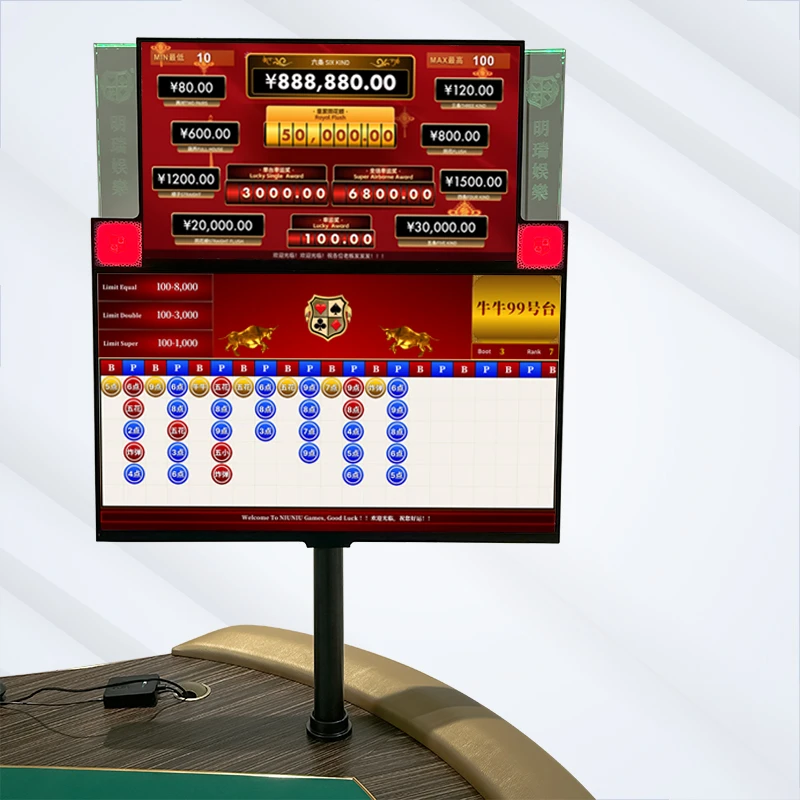
1. Overheating in Baccarat Displays: Causes, Symptoms & Quick Fixes
Overheating is the #1 hardware killer for casino baccarat scoreboard units. Continuous 24-hour operation in pit temperatures often exceeding 28°C (82°F), combined with poor ventilation, leads to internal component stress.
Common Symptoms
- Unit feels hot to the touch on the rear panel
- Automatic shutdown or intermittent blackouts during peak hours
- Fan noise becomes louder or stops entirely
- Color distortion or flickering on the Big Road and derived roads
Step-by-Step Troubleshooting
- Check ventilation – Ensure at least 10 cm clearance behind the display. Casino dust and cigarette residue clog vents quickly.
- Clean the intake filters – Power off the unit, remove the rear cover (if serviceable), and use compressed air.
- Verify ambient temperature – Install the casino baccarat display away from direct air-conditioning vents or heat sources.
- Test power supply – Overheating often stems from a failing internal PSU under load. Swap with a known-good unit.
- Firmware update – Many modern electronic baccarat displays include thermal throttling settings that can be optimized via the service menu.
Pro Tip: Industrial-grade models with fanless cooling or IP-rated enclosures resist overheating far better than consumer-grade monitors disguised as casino equipment.
2. Screen Burn-in & Image Retention on Baccarat Displays
Static roadmap graphics (especially the Bead Plate and Big Road columns) create permanent ghost images on lower-quality LCD/LED panels after weeks of continuous use — a nightmare for player visibility and professional presentation.
Why It Happens in Casinos
- High-brightness settings for visibility under casino lighting
- Identical road patterns displayed for 8–12 hour shifts
- Budget panels without anti-burn technology
Immediate Remedies
- Pixel-shifting / screen saver mode – Activate built-in anti-burn features (common on premium Baccarat Display units).
- Display a full-color test pattern for 30–60 minutes at reduced brightness to help “erase” minor retention.
- Reduce brightness to 60–70% during off-peak hours while maintaining readability of Big Eye Boy, Small Road, and Cockroach Pig markers.
- Professional panel replacement – Severe burn-in requires swapping the LCD module; always use OEM or casino-certified parts.
Prevention Choose Baccarat Scoreboard models with AMOLED-grade anti-burn coatings or commercial-grade IPS panels rated for 50,000+ hours of continuous operation. Regular nightly full-screen cycling (available in advanced Casino Baccarat Display firmware) virtually eliminates this issue.
3. Baccarat Display Not Updating: Sync & Data Transmission Failures
Nothing frustrates players and dealers more than a baccarat display that fails to update after a hand. Results lag or freeze, breaking the flow of live play.
Root Causes
- Poor connection between electronic shoe (Angel Eye, i-SHOE, Shuffle Master, Bee-tek) and the display
- Faulty RS232, Ethernet, or wireless link
- Manual keypad input errors or software mismatch
- Outdated firmware on the electronic baccarat display system
Diagnostic & Repair Steps
- Verify physical connection – Inspect cables for damage; reseat connectors.
- Run self-diagnostic – Most professional baccarat display units feature a built-in test mode that checks shoe communication.
- Re-sync the electronic shoe – Reboot both shoe and display, then re-pair via the setup menu.
- Check protocol compatibility – Confirm the baccarat display supports your exact shoe model’s API version.
- Firmware rollback or update – Download the latest version from the manufacturer (always back up current settings first).
Advanced Tip: API-integrated baccarat display software systems that auto-pull results eliminate manual entry entirely, reducing dealer workload by up to 30% and virtually removing update failures.
Additional Common Faults & Quick Solutions
- Flickering or No Signal → Usually power supply or HDMI/DVI cable issues. Replace cable first.
- Dead Pixels or Lines → Panel defect; contact warranty support immediately.
- Wrong Colors or Dim Display → Backlight failure or calibration drift; recalibrate via service menu.
- Remote Control / Keypad Unresponsive → Battery or IR sensor cleaning required.
Preventive Maintenance Checklist for Casino Baccarat Displays
To maximize uptime and ROI on your live baccarat display investment:
- Weekly: Visual inspection and dust cleaning
- Monthly: Full system reboot and firmware check
- Quarterly: Professional service visit (thermal paste refresh, cable inspection)
- Annually: Full panel calibration and burn-in test
When to Stop Troubleshooting and Upgrade
If recurring faults persist despite proper maintenance, it’s time to invest in a true industrial-grade baccarat display system. Look for:
- 3–5 year on-site warranty
- Fanless or positive-pressure cooling
- Full compatibility with all major electronic shoes
- Customizable roadmap layouts with animated side bets
Ready to eliminate these headaches once and for all?
Discover Macaumr complete range of premium Baccarat Display, Baccarat Scoreboard, and Electronic Baccarat Road Map System solutions engineered specifically for 24/7 casino environments. Our industrial-grade units feature built-in thermal management, anti-burn technology, and seamless electronic shoe integration — delivering zero-downtime performance and maximum player retention.
Explore the full collection here: https://www.macaumr.com/baccarat-display-and-roadmap-system/
Don’t let faulty hardware cost you table revenue. Equip your pit with displays that work as hard as your dealers. Contact our casino equipment specialists today for a no-obligation consultation and live demo.
