

MCP development services help businesses connect AI agents to the systems where their real work happens, such as the CRM, the ERP and internal databases, through the Model Context Protocol, an open standard now backed by most major AI providers. Done well, an MCP server lets AI read customer records, check stock or draft orders while every request stays inside the permissions your company already enforces. The hard part is not making the connection work, but deciding exactly what the AI may touch and proving afterwards what it did.
What MCP is and why businesses are adopting it
Most companies that experimented with AI assistants in the past two years hit the same wall. The model can write, summarize and reason, but it cannot see the customer’s order history, the current inventory or the contract terms stored in internal systems. Every attempt to bridge that gap turned into a one-off integration built for a single AI tool. The Model Context Protocol was created to remove that wall in a standard way.
How the Model Context Protocol works in plain terms
The Model Context Protocol (MCP) is an open protocol that defines how AI applications connect to external data and tools. Anthropic introduced it in November 2024, and in December 2025 it was donated to the Agentic AI Foundation under the Linux Foundation, co-founded by Anthropic, Block and OpenAI with support from Google, Microsoft, AWS and others. That move matters for businesses because it makes MCP a vendor-neutral standard rather than one company’s feature.
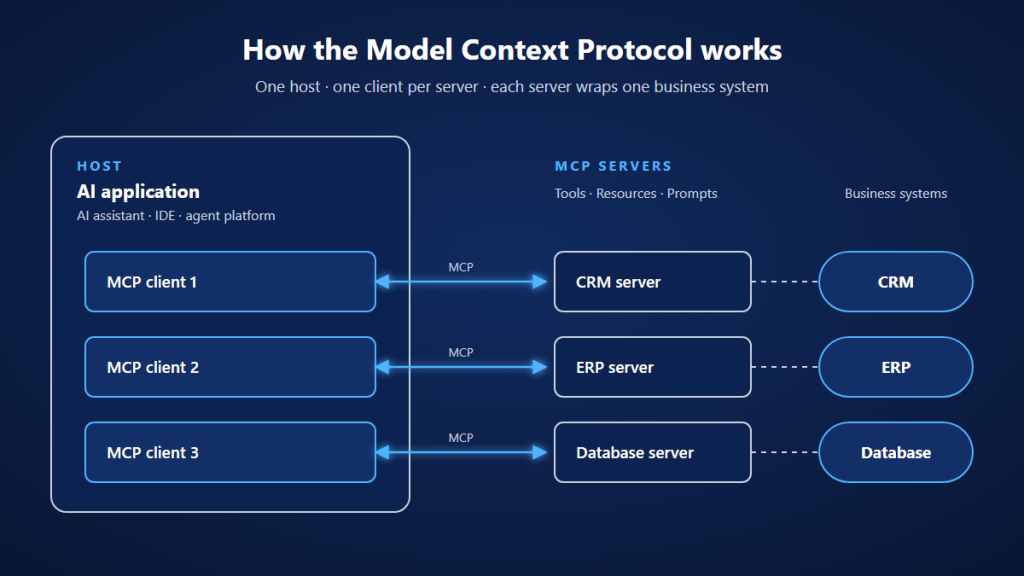
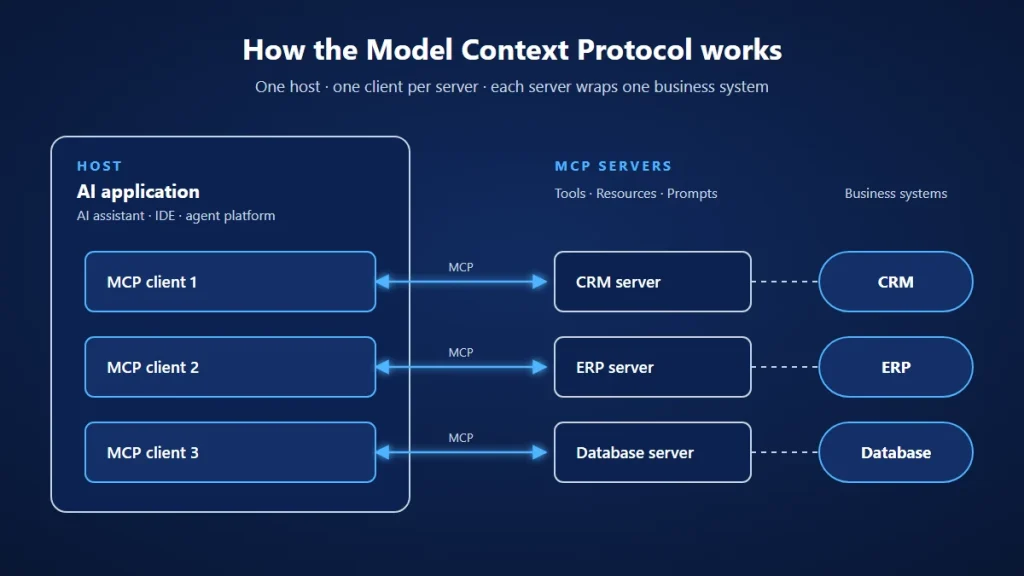
The protocol has three roles:
- Host: The AI application your users work in, such as an AI assistant, an IDE or an internal agent platform.
- Client: The connector inside the host that maintains a session with one MCP server.
- Server: A program that exposes a business system to AI in a controlled way, through tools (actions the AI can call), resources (data it can read) and prompts (reusable instructions).
An MCP server is where the real development work happens. It sits between the AI and your system, translates requests into API or database calls, and decides what comes back.
Why one standard beats a growing pile of custom AI integrations
Without a shared protocol, each combination of AI application and business system needs its own connector. Three AI tools and five internal systems can mean fifteen integrations, each with its own authentication logic, error handling and maintenance schedule. When the company switches AI providers, much of that work starts again.
The risk is not only cost. Custom connectors are often written quickly for a pilot, with a shared service account that has far more access than the AI needs and little record of what was requested. Once these pilots reach production, the security team inherits connections it never reviewed.
With MCP, a system is wrapped once as an MCP server and can then be used by any compatible AI application. Permissions, logging and validation live in one place. This is the main reason businesses look for MCP development services: they want AI agents that work with real data, built on a structure that the IT and security teams can actually govern. The impact shows up as faster rollout of new AI use cases, less dependence on a single model vendor and a much smaller attack surface to audit.
How an MCP server architecture connects AI agents to your core business systems
Connecting AI to a CRM, an ERP or a database is not the same task three times. Each system has different data sensitivity, different consequences when something goes wrong and different integration options. Experienced teams therefore start with an architecture that separates concerns into clear layers, then design the tools for each system individually.
The layers of an enterprise MCP setup
A production-grade setup usually includes these layers:
- AI hosts and agents: The assistants and agents that employees or customers use.
- Gateway or registry: A central point that lists approved MCP servers, routes requests and enforces company-wide policies, so teams cannot quietly connect unreviewed servers.
- MCP servers per domain: One server for the CRM, one for the ERP, one for reporting data and so on. Splitting by domain keeps permissions narrow and lets each server be updated on its own schedule.
- Identity provider: Your existing single sign-on, used to authenticate the person behind every AI request.
- Business systems: The CRM, ERP, databases and internal APIs, accessed only through their official interfaces.
- Logging and monitoring: A central store for audit records and alerts.
MCP supports two main ways of running a server. A local server communicates with the host on the same machine, which suits developer tools. A remote server runs over HTTP and serves many users, which is the usual choice for enterprise systems because it can be deployed in your own cloud or data center and placed behind existing network controls.
Connecting a CRM through business-level tools
The common mistake with CRM integration is exposing the CRM’s raw API to the AI. The model then has to understand dozens of endpoints and field names, makes more errors and gains access to far more than it needs.
A better design exposes a small set of tools that match real tasks: look up an account summary, list open opportunities for a customer, log a call note, draft a follow-up task. Each tool returns only the fields the task requires, and personal data such as phone numbers can be masked unless the user’s role allows it. Sales teams get answers in seconds, and the security team knows exactly which operations exist.
Connecting an ERP system where every action has financial impact
ERP data covers inventory, purchasing, invoices and accounting, so mistakes have a direct financial cost. Here the line between reading and writing matters most. Read tools, such as checking stock levels or the status of a purchase order, can be widely available. Write tools, such as creating a purchase order or changing a price, should create drafts that a person confirms, and should respect the same approval workflow the ERP already enforces for human users.
Older ERP systems often lack modern APIs. In that case the MCP server may sit on top of an integration layer or a carefully scoped database view, which is where experience with legacy systems becomes important.
Connecting internal databases without handing AI raw SQL access
Letting an AI agent write free-form SQL against a production database is tempting because it seems flexible. It also means one misunderstood question or one manipulated prompt can read sensitive tables or lock the database with a heavy query.
Safer patterns include parameterized query tools for common questions, read-only replicas or curated views instead of live tables, row-level security that filters results by the user’s permissions, and limits on result size and query time. The AI still answers questions like “Which customers in Osaka had late deliveries last month?”, but only within boundaries that were designed in advance.
How to control permissions and keep an audit trail for every AI action
Connecting systems is the visible part of the project. Controlling what happens through those connections is the part of MCP development services that deserves the most attention, because an AI agent with access to business systems is effectively a new kind of user. It acts quickly, it can be misled by the content it reads, and without proper design nobody can tell afterwards who asked it to do what.
Authenticating users and acting on their behalf
For remote servers, the MCP specification bases authorization on OAuth 2.1, with the MCP server acting as a resource server that validates the access credentials issued by your identity provider. In practice this means the AI does not hold a master key. Each request carries a short-lived credential tied to the actual user, and the server checks that this credential was issued for it specifically.
The specification is explicit that an MCP server must not accept credentials issued for other services and simply forward them downstream. That shortcut weakens security controls and makes downstream logs show the wrong caller. Instead, the server should obtain its own credentials for downstream systems and map each user’s identity to the permissions they already have in the CRM or ERP.
Limiting what each tool can do and when a human must approve
The OWASP Top 10 for LLM Applications 2025 lists excessive agency, an AI system holding more permissions or autonomy than its task requires, among the most serious risks. MCP servers reduce it through deliberate design:
- Least privilege per tool: Each tool can only reach the data and actions it needs, using scoped credentials rather than an administrator account.
- Separate read and write tools: Viewing a record and changing it are never the same tool, so access can be granted independently.
- Human approval for high-impact actions: Refunds, price changes, deletions and outgoing emails require explicit confirmation before they run.
- Rate and volume limits: Caps on how many records a tool returns or how many actions it performs per minute stop runaway loops and bulk data extraction.
Audit logs that show who did what through which agent
When an AI agent updates a customer record, the audit trail should answer four questions without guesswork: which person initiated the request, which agent and model were involved, which tool was called with which parameters, and what the result was. Logs should be written to a central, tamper-resistant store with a defined retention period, and sensitive values should be masked before they are stored.
Good audit logging serves more than compliance. It lets teams investigate a wrong answer, prove to auditors that AI access follows company policy and spot unusual patterns, such as an agent suddenly requesting thousands of records at night.
Security risks that are specific to MCP servers
Some threats only appear once AI and tools are connected:
- Prompt injection through data: An email, ticket or document read by the AI can contain hidden instructions that try to trigger tool calls. Write actions should never depend only on the model’s judgment.
- Tool poisoning: A malicious or compromised third-party MCP server can describe its tools in a way that manipulates the AI. Only approved servers from a vetted registry should be allowed.
- Confused deputy: The MCP security guidance warns that a server acting as a proxy for third-party APIs can be tricked into using its own authority on behalf of an attacker, so per-client consent and strict validation are required.
Handling these during design costs far less than responding to a data leak after launch. It is also what convinces security teams to approve AI access to production systems in the first place.
Building MCP servers in-house or hiring MCP development services
A basic MCP server can be built in an afternoon with the official SDKs, which makes the build-or-hire question easy to underestimate. The demo is simple. The production version, with identity integration, permission mapping, audit logging, testing against manipulation and ongoing maintenance as the specification evolves, is a different scope of work.
When building in-house makes sense
Building internally is a reasonable choice when your team already has engineers who know both your systems and modern AI tooling, the first use cases are internal and low risk (for example read-only access to documentation), and you have a security team able to review the design. Keeping the work in-house also builds knowledge you will need as AI agents spread across the company.
When an experienced development partner saves time and risk
Hiring MCP development services is usually the better option when the servers will touch customer data, financial records or regulated information, when the systems involved are legacy platforms without clean APIs, or when internal engineers are fully committed to the core product. An experienced team brings tested patterns for authentication, permission mapping and audit logging, which shortens the path from pilot to production and reduces the chance of security gaps.
A hybrid model often works best. The partner designs the architecture and builds the first servers together with your engineers, then hands over documented code and processes so your team can extend them. To see how AI agents are integrated into a client’s existing business systems with access control and data isolation per environment, see this AI agent case study.
Questions to ask before choosing a partner
If you compare providers of MCP development services, these questions reveal how production-ready their approach is:
- How will you authenticate users and map their existing permissions? Look for OAuth 2.1 with your identity provider and per-user authorization, not a shared service account.
- Which actions will require human approval? A good partner proposes a clear list during discovery rather than leaving it to the model.
- What will the audit log record, and where will it be stored? Expect user, agent, tool, parameters and result, in a store your team controls.
- How will you test against prompt injection and tool misuse? Adversarial testing should be part of the plan before launch.
- Where will the servers run? Options should include your own cloud or on-premise environment for sensitive systems.
- How will you keep up with changes to the MCP specification? Ask for a maintenance plan and versioning approach.
- Who owns the code and documentation after the project? You should be able to hand the servers to another team if needed.
Clear, specific answers point to a team that has run MCP servers in production. Vague answers about security or ownership are a sign the project is being planned for the demo rather than for daily use.
The value of MCP development services lies not in making an AI agent talk to a CRM or ERP, which is easy to demonstrate, but in doing it in a way the business can trust. That means a layered architecture, tools designed around real tasks, authorization tied to real users, human approval for high-impact actions and an audit trail that explains every step. Whether you build in-house, hire a partner or combine both, these foundations decide whether AI agents remain a pilot or become part of how your company works every day.
About Relipa
Relipa is a Vietnam-based software development company established in April 2016. After two years of growth, our Japanese branch, Relipa Japan, was officially founded in July 2018.
We provide AI development services from consulting and development to integration and long-term maintenance, with every solution built around your data and the systems you already use. If you are planning an AI project, our team is ready to help you find the right approach.
