
As IT services outsourcing companies, we’ve learned that successful AR projects depend on more than innovative ideas. Choosing the right development environment and AR libraries is essential for building stable, high-performance applications across different platforms.
Based on our development experience, each platform has its own strengths, recommended frameworks, and technology stack. In this article, we share practical insights into AR development environments, popular libraries such as ARKit and ARCore, and recommendations to help businesses choose the right tools for their AR projects.
What You Need to Do for AR Development
Based on our experience as IT Services Outsourcing Companies, for AR development, you need a development environment used to develop the application itself and a library for AR. Let’s see what kind of integrated development environment(IDE) and libraries are available for each.
Development Environment
Regarding the development environment, it is basically the same as the development environment of a normal application. Select the development environment to use according to the language to be used. Since the environment to be used changes depending on the target of the AR to be developed, let’s first clarify the target device.
IDEs for application development include Xcode provided by Apple, Android Studio provided by Google, Unity, which has strengths in VR / AR, and Visual Studio of Microsoft.
The languages used to develop AR include Swift for iOS and Kotlin and Java for Android. Also, if you use Unity, it will be C #, and if you are using Web AR that implements AR on the Web instead of an app, it will be HTML + JavaScript.
Library for AR
Regarding the library framework used in AR development, we will explain six typical ones, focusing on the library provided by the platform official. In addition to the libraries introduced this time, there are also libraries such as A-Frame and AR.js that are often used in Web AR development.
AR libraries recommended by IT Services Outsourcing Companies
Based on our experience as IT Services Outsourcing Companies, selecting the right AR library depends on your target platform, development goals, and required features. Here are some of the most widely used AR frameworks.
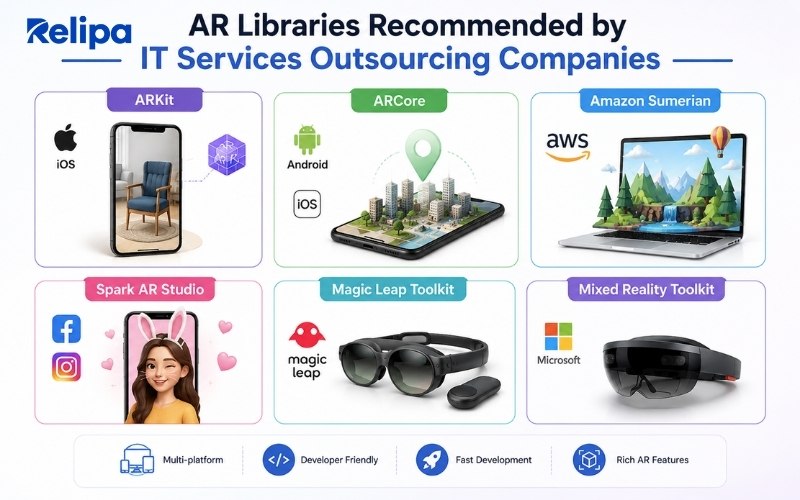
Apple ARKit
AR library for iOS provided by Apple Inc. requires a device equipped with a CPU that supports ARKit to operate. The programming language used for development is either Swift or Objective-C, and the latest version is the ARKit 4, released in June 2020.
ARKit has a powerful face tracking function, but the characteristic feature of the latest ARKit 4 is probably “Location Anchors”. This function allows you to place AR objects on famous spots and landmarks that actually exist based on Apple’s 3D map data.
In the conventional AR, the AR was displayed individually for each terminal, but in the AR using the location anchor, the CG object is placed in a specific place in the real world, so it is now possible for multiple people to see the same AR. You can view and walk the installed AR objects from any angle and share a more interactive experience.
AR Core
This is an AR library provided by Google. Unlike ARKit, which runs on Apple devices, ARCore works on a wide range of devices and supports the following development environments.
- Android native (Java, Kotlin)
- Unity
- Unreal
- iOS native (Objective-C, Swift)
Since it also works on iOS, there are cases where ARCore is selected as the library when developing cross-platform AR apps. For example, if you develop with ARCore + Unity, you can develop with cross-platform Android and iOS. However, compared to ARKit, there are some disadvantages such as weak object tracking and motion capture.
Amazon Sumerian
It is an AR development library based on AWS provided by Amazon. Works on multiple platforms, supports WebGL and WebVR, as well as web browsers (Chrome, Firefox, etc.), mobile browsers (iOS, Android, etc.), Oculus Go, Oculus Rift, HTC Vive, HTC Vive Pro, Google Daydream, Lenovo, and it also supports Mirage.
The development languages are HTML and JavaScript. The development environment is also browser-based and the threshold is relatively low. You can easily create VR and AR apps and embed them in your existing website without any special programming or 3D graphics processing expertise.
Spark AR Studio
An AR library developed by Facebook, known as an IDE for creating AR effect filters for use in Instagram stories. The tool is provided free of charge, and in addition to detailed tutorial videos, there are plenty of templates that make it easy to create AR, so you can develop a simple AR without writing any code. Therefore, it is possible to create AR effects even without any knowledge. Compared to other AR development tools, the development threshold is very low.
Effects created using Spark AR Studio can be published on Facebook and Instagram. By creating and publishing effects, you can acquire followers and connect them to purchasing behavior, which can be used for commerce on SNS.
Magic Leap Toolkit
Head-mounted AR display. This is an AR library dedicated to Magic Leap. The functions required when developing content for Magic Leap have been optimized and will be incorporated into Unity for use. Development of content for Magic Leap also supports C languages and HTML + JavaScript, but the only library provided is Unity.
Mixed Reality Toolkit
A development framework for HoloLens provided by Microsoft. Content for HoloLens is done in Unreal or Unity, but the framework for HoloLens is only available in Unity. Therefore, when creating AR content for HoloLens, it is almost essential to combine Virtual Studio as the IDE, Unity as the development language, and Mixed Reality Toolkit as the development framework.
What is Recommended to Start AR Development?
Based on our experience as IT Services Outsourcing Companies, when developing AR for the first time, it is recommended to do it in a development environment that you are familiar with as much as possible in order to reduce the points of tripping.
However, the development environment to be built differs depending on the platform, such as whether the target device is an iOS device, an Android device, or HoloLens. Therefore, start AR development after setting a clear direction for which layer to release the AR application.
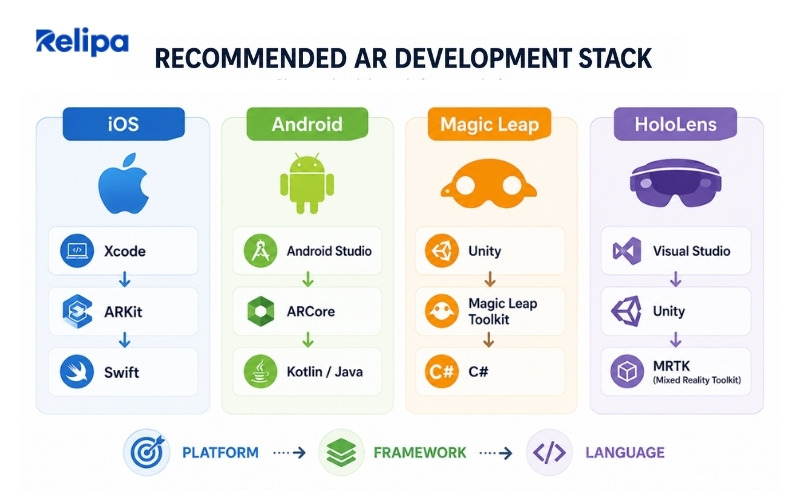
Make an app for iOS
If you are accustomed to developing with Xcode, Xcode + ARKit is recommended. Unless you have a specific reason, it is safer to use the environment provided by Apple official for AR content for iOS. In this case, Swift is mainly used as the development language.
If you need cross-platform development with other platforms, or if you are accustomed to developing with Unity, you can also develop with Unity + ARKit.
Make an app for Android
If you are accustomed to developing with Android Studio, it is better to develop with Android Studio + AR Core. When using Android Studio, Kotlin and Java are the main development languages.
As mentioned above, AR Core also supports Unreal Engine, Unity, Swift, and Objective-C, so if you want to do cross-platform development, or if you want to develop AR that runs on platforms other than Android, use Unity. In some cases, you may choose another language, such as the one you started with.
Make an app for Magic Leap
The official Magic Leap development environment is a combination of Unity + Magic Leap Toolkit. The app for Magic Leap can also be developed on Unreal Engine, but the library provided by the official is for Unity, so unless there is a particular reason to use Unreal Engine, it will be developed with C # in Unity.
For apps for HoloLens
The combination of Visual Studio + Unity + Mixed Reality Toolkit is recommended for developing apps for HoloLens, and since the provision of libraries and frameworks is based on Unity and Visual Studio, it will be developed in the recommended environment. HoloLens2 is also supported for development on Unreal Engine, but currently it’s mainly based on Unity.
Real AR Development Projects from IT Services Outsourcing Companies’ Relipa
Relipa (IT Services Outsourcing Companies) is developing an AR app for iOS. In addition to seeing our AR achievements, we will also introduce the environment and AR library used for actual AR development.
AR Furniture
AR Furniture is a markerless AR app that allows you to experience a professional home designer with the power of AR. By scanning your room, you can freely place the registered virtual furniture in your room with AR. When considering redecorating a room or replacing furniture, AR furniture can be used to develop a concrete image on top of a real room. You can actually imagine what kind of furniture and color arrangement will be from the imagination base. Markerless AR is the most difficult AR to develop among various ARs, but we can firmly recognize the size of the room and arrange virtual furniture without any discomfort.
The AR furniture was created with the following libraries and development environment.
- Development environment: MacOS 10.15, Xcode 12, iOS 14
- Library: ARKit, SceneKit
- Language: Swift
- Target model: iOS13
AR outfit
AR Outfit is a coordination app that allows you to try out wearing images before purchasing by fitting clothes and sunglasses made of AR objects to yourself by capturing them with the camera of the device.
Even though clothes are bought online, it is not uncommon for the photos to differ from the actual wearing image, and the coordination with the clothes already has is different from what you imagined. In order to avoid such troubles after purchase, this AR app allows you to check the wearing image more easily than trying on at an actual store. You can easily experience AR in real time with just two steps of swiping and selecting items.
The AR outfit was created with the following libraries and development environment as well as the AR furniture.
- Development environment: MacOS 10.15, Xcode 12, iOS 14
- Library: ARKit, SceneKit
- Language: Swift
- Target model: iOS13
Summary
From our experience as IT services outsourcing companies, there is no one-size-fits-all approach to AR development. The right development environment and AR library depend on your target platform, project requirements, and long-term goals.
By selecting the appropriate tools from the beginning, businesses can simplify development, improve application performance, and create more reliable AR experiences. Whether you’re building for iOS, Android, or multiple platforms, choosing the right technology stack is the first step toward a successful AR project.
If you want to try AR development, why not choose one from the development environments introduced here that you can easily do at your fingertips. Contact Relipa for more information!
Relipa
Relipa is a Vietnam-based software development company established in April 2016. After two years of growth, our Japanese branch – Relipa Japan – was officially founded in July 2018.
We provide services in MVP development, web and mobile application development, and blockchain solutions. With a team of over 100 professional IT engineers and experienced project managers, Relipa has become a reliable partner for many enterprises and has successfully delivered more than 500 projects for startups and businesses worldwide.
