
ChatGPT drew 100 million users after just 3 months of unveiling, outpacing TikTok’s initial rapid growth. After launching to the market in November 2022, ChatGPT generated an AI sensation, attracting not only attention but also vigilance, because of its unprecedented abilities such as human-like conversation, programming, text translation, and more.
So, how can we take advantage of ChatGPT to help us in the real business world? Let’s find out through some common use cases of ChatGPT in business.
I. INTRODUCTION
A Brief Overview of ChatGPT and What It is Used For
ChatGPT, which stands for Chat Generative Pre-training Transformer, is a chatbot developed by OpenAI. This type of neural network is trained on a vast data set of text, allowing it to generate human-like responses to user inquiries. Simply put, ChatGPT is an Artificial Intelligence chatbot and is considered the brightest spark of artificial intelligence til now. Its unique selling points are content creation, programming, debugging, data analysis, explanation, tutoring, etc.
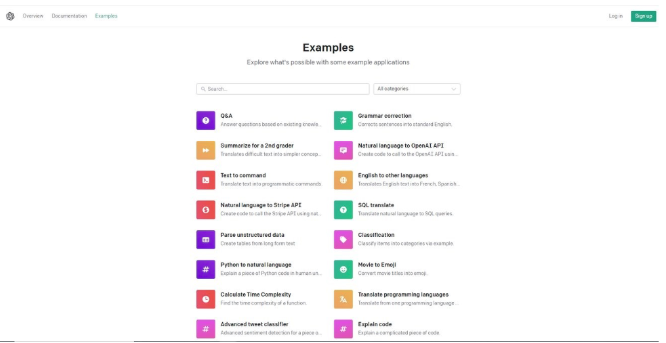
Source: OpenAI
One of the main advantages of ChatGPT is natural language processing and the generation of texts trained on a large corpus of text data. Here are some outstanding applications of ChatGPT:
- Content Creation: ChatGPT is capable of natural language cognitive and generating original content from existing data. Content created by ChatGPT is as sophisticated as if it were written by humans. The technology leverages its inputs (the data it has ingested and a user prompt) and experiences (interactions with users that help it “learn” new information and what’s correct/incorrect) to generate entirely new content. The ubiquitous use cases in terms of creating content are composing poems or even musical lyrics and writing stories. In addition, ChatGPT is also widely used to summarize texts, translate languages, and answer questions as an “AI assistant”.
- Programming and Debugging: You can ask ChatGPT to program in many different languages, translate between programming languages, explain algorithms, and help programmers debug their software. Try out ChatGPT for programming projects with Python, JavaScript, or SQL editor, and write Excel functions to get started. You will be amazed at what ChatGPT can do.
- Data Analysis: Unstructured data causes many difficulties in classification, management, and analysis. ChatGPT can save us from these headaches with its easy conversion of unstructured data into structured data. Explore ChatGPT’s data processing capabilities, starting with tables and JSON, to learn more.
- Explanation and tutoring: It’s noteworthy that ChatGPT can explain terms and pieces of code in programming or physics in a comprehensive way. As ChatGPT’s AI tutoring capabilities are developed and become more well-qualified in the near future, it can dramatically change the way learners interact with the outside world and greatly aid in self-study.
Read more: Unlocking the Power of ChatGPT API (gpt-4): A Complete Guide
Importance of Understanding How to Use ChatGPT for Various Purposes
According to the aforementioned information, having a good command of how to use ChatGPT for specific purposes can exert positive impacts on your business entities. ChatGPT promises to become a game-changer for businesses.
- The enhancement of efficiency and productivity. ChatGPT is conducive to emancipation people from repetitive tasks, followed by saving time, reducing costs, and offering new growth opportunities.
- The increase in accuracy. ChatGPT can provide accurate and consistent responses, reducing the risk of human error.
- The betterment of customer experience. By virtue of quick and concise responses, ChatGPT can improve overall customer satisfaction.
- The enhancement of language generation. ChatGPT can generate high-quality text for various applications, such as content creation and language translation.
- The advancements in AI research. ChatGPT can contribute to the development of AI technologies and further our understanding of natural language processing.
Overall, having a firm grasp of knowledge about how to use ChatGPT can lead to improved outcomes across various industries and applications.
II. HOW TO USE CHATGPT
Steps for Signing Up and Using ChatGPT
- Step 1: Accessing https://chat.openai.com/
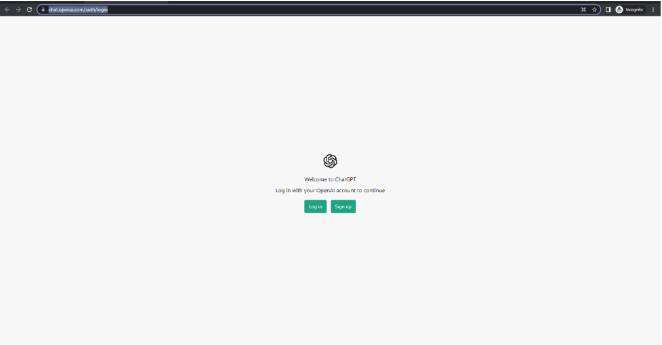
- Step 2: Click the button “Sign up”
- Step 3: After entering your email, click “Continue”. Apart from this way, you can choose to continue with Google or continue with Microsoft Account to sign up
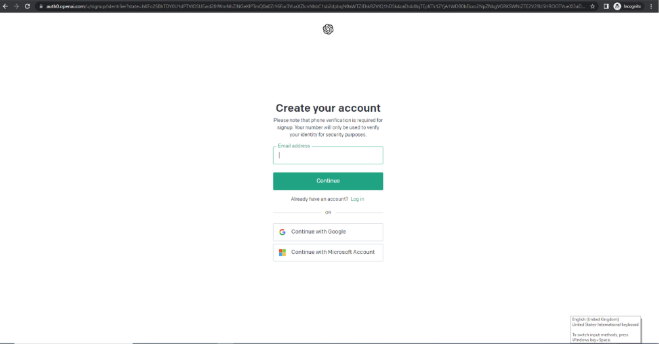
- Step 4: Open your email to get your verified code. In case you don’t receive an email from OpenAI, click “Resend email”.
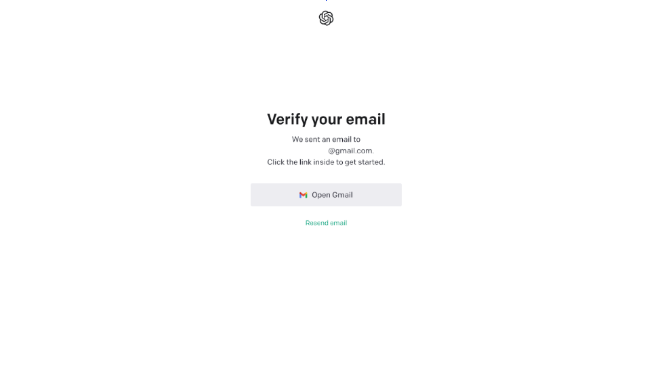
- Step 5: Click the “Verify email address” button to verify your email with OpenAI
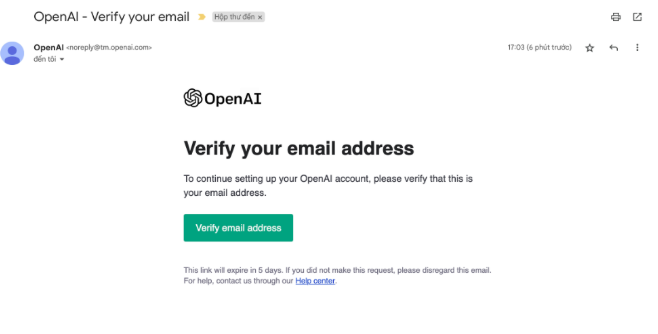
- Step 6: Click the login button to log in with the created ChatGPT account after successful email verification.
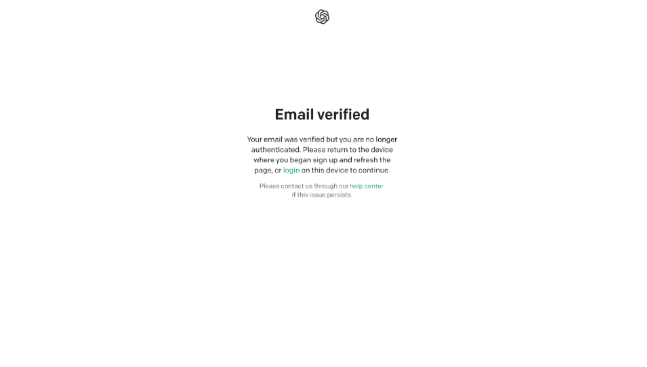
- Step 7: The first time you log in to ChatGPT, you need to enter your first name and last name. Then, click the button “Continue”
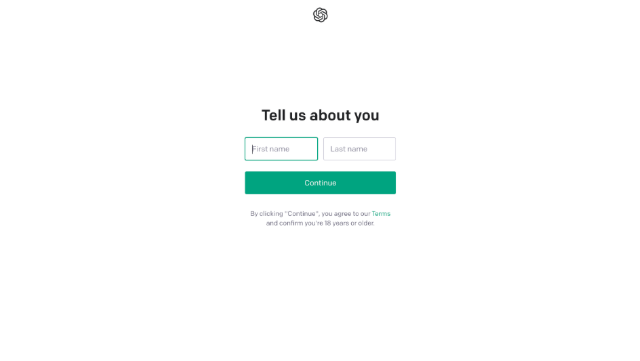
- Step 8: Enter your phone number and verified the code
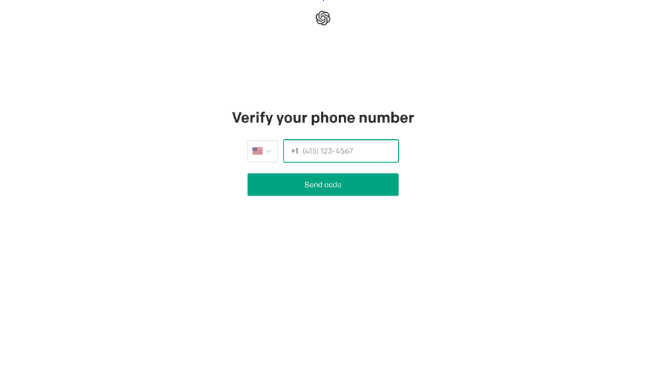
Congratulation! At this point, you have successfully created a ChatGPT or OpenAI account. Let’s start exploring it!
ChatGPT has a lean user interface with basic functions. The majority part of the screen is a conversation where users can enter their requests and receive answers from ChatGPT.
- New chat: Kick off a conversation
- Clear Conversation: Delete conversation history
- Light mode/Dark mode: Choose your preferred mode
- Prompt: Users type their inquiries in this window
- Edit/Save & Submit: Edit the entered inquiry and receive an updated answer
- Like & Dislike: Send feedback to ChatGPT based on the results received to improve response accuracy.
- Regenerate response: If you are not satisfied with ChatGPT’s answers or ChatGPT has an error, you can use this button to generate new answers.
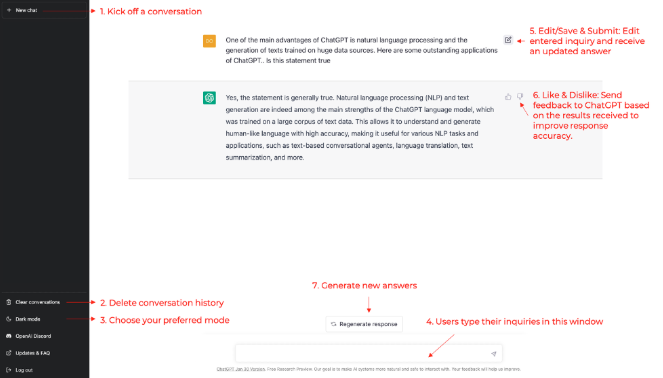
Overview of The Input and Output Format of ChatGPT
Input (Prompt): Prompt is the foundation of AI tools, including ChatGPT. The ability to use the prompt determines the value you can get after giving commands to the AI tool. As a consequence of general questions, you can only get general answers. Hence, the more well-defined and context-rich the prompt, the more valuable the response you will get.
In short, a prompt is information you instruct AI tools to do what you want them to do. The input format can be questions, statements, or requests in many languages. Currently, ChatGPT can perform to the best of its ability in English.
Output: The format of the output is also a text string, which is generated by the model to respond to the input. The outputs are ranked based on the highest probability of being accurate, but they can be filtered or refined based on specific parameters. ChatGPT is highly customizable, allowing developers to fine-tune the model for specific use cases and applications, such as text generation, text completion, and language translation (just to name a few). OpenAI has combined both Supervised Learning and Reinforcement Learning Human Feedback (RLHF) to fine-tune ChatGPT, but it is the RLHF component specifically that makes ChatGPT unique. By virtue of Reinforcement learning, it can alleviate biased, inaccuracy, and untruthful output.
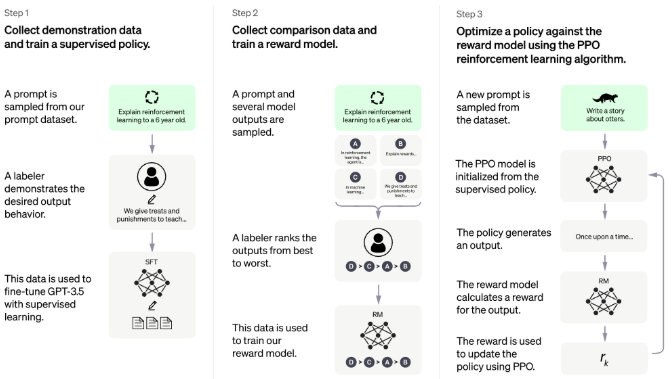
Source: OpenAI
Explanation of How to Fine-tune ChatGPT for Specific Use Cases
Voice and Style Guide
Here are some tips when chatting with ChatGPT to have answers that follow specific penmanship and format.
- Focus on the main idea: “Return only the main response. Remove pre-text and post-text”
- Plain Language: “When explaining complex topics, let’s use straightforward language and keep sentences clear and concise. Steer clear of technical terms and abbreviations”.
- Natural Conversation: “Answer in a friendly tone as if you were talking to your friends. Use common phrases, and vocabulary that an ordinary person uses every day”.
- Engaging and Outstanding Contents: “Use imaginative language. Adopt a concise writing style. Utilize short, pithy sentences that pack a punch.”
- Story-telling: Utilize metaphors, analogies, and other literary arts to create a storyline relatable and memorable. Besides, let’s provide a story that is told in a persuasive tone, and rhetorical questions to engage readers.
- Creative Content: Utilize metaphors, similes, personification, and other literary arts to create interesting and in-depth content. Besides, let’s provide content that is told in vivid language to create a sense of imagery and atmosphere
- Formal and information-rich content: Answer in a formal and informative tone. Especially, using specific industry-based terminology. Have a credible source to back up your proposed information. Provide content as accurate and academic as possible. Write in a way that is both informative and knowledgeable.
- Markdown-formatted content: Format your response using markdown. Use headings, subheadings, bullet points, and bold to organize the information.
Role-playing to Give Advice
Each conversation with ChatGPT will start from scratch, it has no information about the context or purpose of what you want it to do.
For example, if I make I general prompt such as “What are some cuisines that I can eat in Seoul?”, I can receive a fairly useful answer.
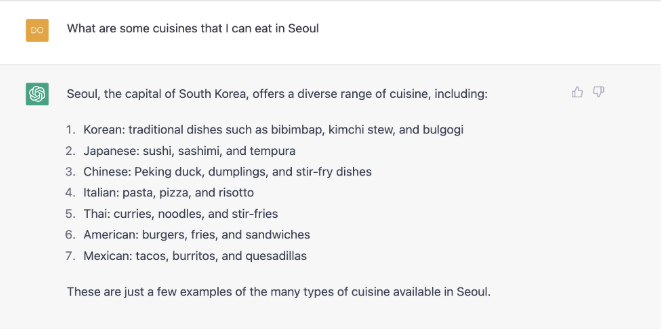
However, I want ChatGPT to act as a tour guide, and the answer should really help with more information. Try the following prompt, in which I want ChatGPT to act as a tour guide. I describe how they will interact with each other and how they should respond.
“I want you to act as a travel guide. I will write you my location and you will suggest a place to visit near my location. In some cases, I will also give you the type of places I will visit. You will also suggest to me places of a similar type that are close to my first location. My first suggestion request is that I am in Seoul and I want to experience some cuisines.”
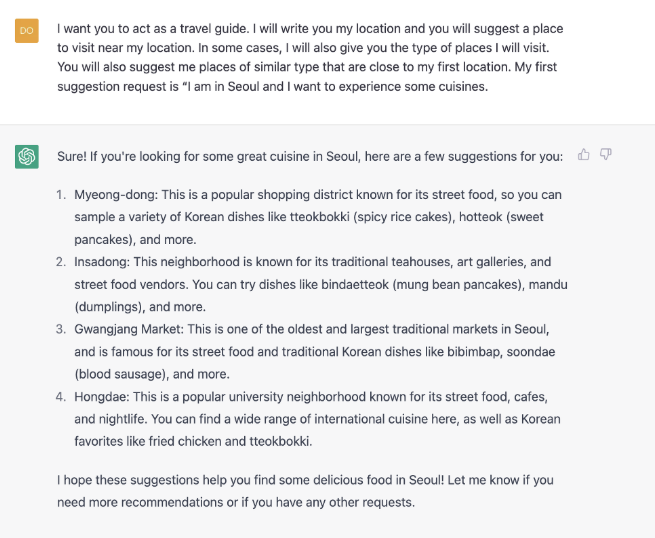
By virtue of this new prompt, ChatGPT has narrowed down recommendations for me. It also provides a brief description of why this advice is being offered, along with the address of the cuisine.
These examples of prompts were based on the ebook named “Simple Guide ChatGPT” by Sam Szuchan
III. USE CASES OF CHATGPT
Use Cases of ChatGPT in Different Industries
ChatGPT is still in the early stages of scaling, but we can see some applications across diversified industries:
|
Marketing and Sales |
Operations | Risk and Legal | HR |
Utility/Employee Optimization |
| Writing promotional content for sales and marketing in form of texts, images, and videos (Eg, to promote products or services, such as for social media content or technical sales presentations) | Enhancing customer support chatbots to solve customers’ problems including generating relevant cross-sell leads | Draft and review legal documents, including contracts and patent applications | Assist in designing interview questions for candidate assessment (Eg, targeted to function, company philosophy, and industry) | Optimize communication of employees (Eg, automate email responses and text translation or change tone or wording of text) |
| Creating product guidelines for users depending on various industries (Eg, medicines or tech products) | Detecting production errors, anomalies, and defects from images to provide root causes for issues. | Summarize information and highlight the main idea of long legislation or legal documents | Provide self-serve HR functions (Eg, automate first-line interactions such as employee onboarding or automate Q&A or strategic advice on employment conditions, law, regulations, etc) | Create business presentations based on prompts, including visualizations, by summarizing text. |
| Analyzing customers’ pain points by summarizing and extracting important patterns from online data | Optimizing customer service by means of automated systems and enhancing agent efficiency. | Providing output based on a large number of legitimate documents, including public and private company information | Create a concise summary by synthesizing information from various sources such as text, presentations, and video meetings. | |
| Enhancing the sale team’s performance by defining risks, and proposing next interactions such as supplementary product offerings. or finding optimal customer interaction that leads to growth and retention | Identify clauses of interest, such as leveraging comparative document analysis | Enable search and question answering on companies’ private knowledge and learning content | ||
| Enhancing sale support chatbot, followed by assisting potential customers to have a grasp of information about technical products, compare and choose products. | Automated accounting by sorting and extracting documents, using automated email openers, high-speed scanners, machine learning, and intelligent document recognition. |
Source: McKinsey
Real-world Use Cases of ChatGPT
Marketing and Sales
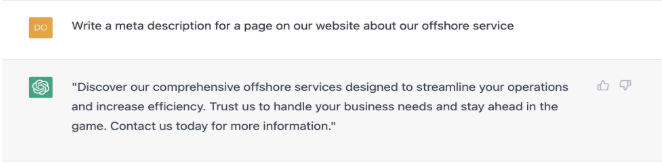
- Writing promotional content for sales and marketing
Prompt: Write a meta description for a page on our website about our [Your services and products].
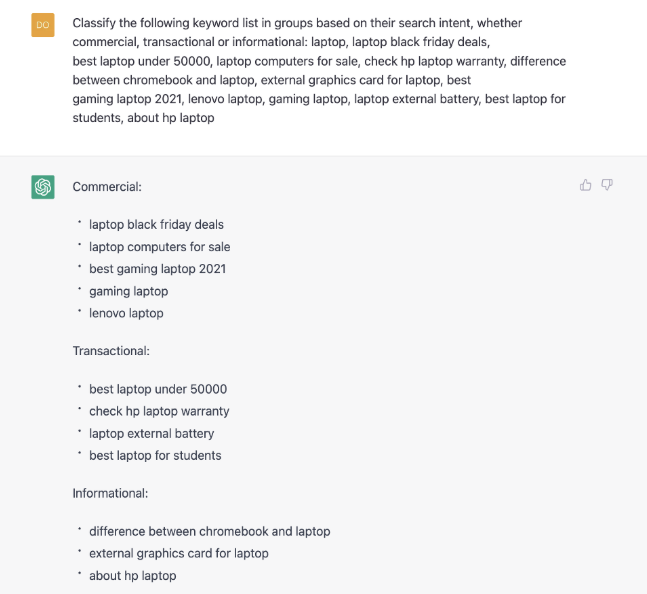
- Keyword Classification for SEO
Prompt: Classify the following keyword list in groups based on their search intent, whether commercial, transactional, or informational: [List of your keywords].
- Market Research:
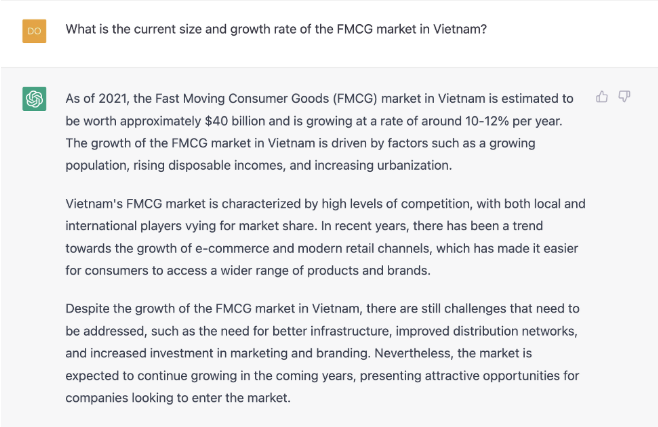
Market Sizing:
Prompt: What is the current size and growth rate of [your targeted market]?
Define and analyze main competitors:
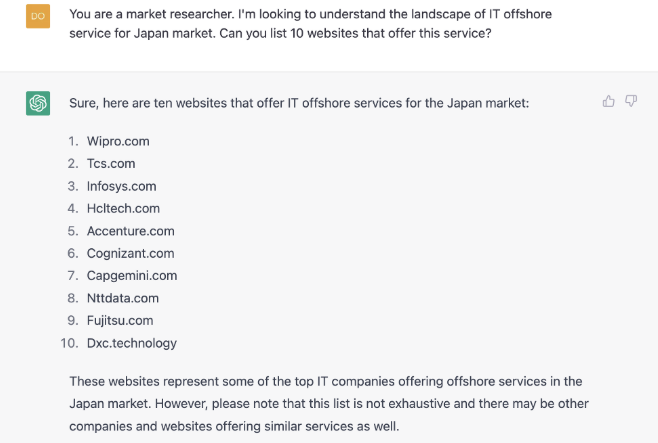
Prompt: You are a market researcher. I’m looking to understand the [landscape of your service/product]. Can you list 10 websites that offer this service?
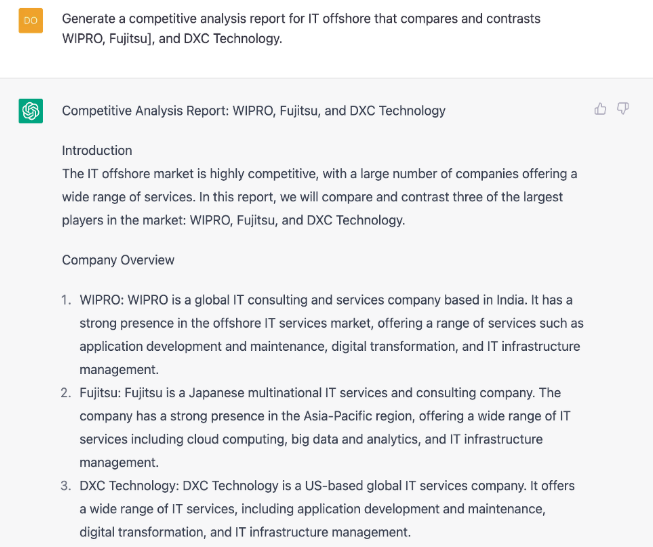
Prompt: Draw up a competitive analysis report for [industry] that compares and contrasts [competitor 1], [competitor 2], and [competitor 3].
Some other prompts that can help you get a deeper insight and overview of the market:
“I have intended to develop a [app category] app. Draw up a market research report for [industry] that highlights key trends, threats, and opportunities. Provide as credible a source as possible.”
I am developing a [app category] app. Based on recent research, create a market forecast that highlights the biggest threats and opportunities on the horizon. Expand on each point with data to back it up.”
What are the key demographics of [users] in the [category] market in [region and/or countries] for [type of product/service] and how can we target and appeal to these demographics with our [product/service]?
Operations
Customer support chatbot
You can integrate ChatGPT with your Facebook, Twitter, or WhatsApp to make your customer service 24/7 available with 100% answers and quick responses. Thanks to this application, you can reduce the operating costs related to tedious tasks.
- Set up a Facebook Page: If you don’t already have a Facebook Page for your business or organization, create one.
- Create a Facebook App: To integrate a chatbot on Facebook, you’ll need to create a Facebook App. Go to the Facebook Developer website, log in with your Facebook account, and click on the “Create App” button.
- Connect to the Facebook Page: In the Facebook App Dashboard, go to the “Messenger” section and connect the App to your Facebook Page.
- Get the Page Access Token: To enable your chatbot to send and receive messages, you’ll need to get a Page Access Token. You can get this token by navigating to the “Token Generation” section of the Messenger settings.
- Set up a Webhook: A webhook is a URL to which Facebook will send messages. In the Messenger settings, set up a webhook and specify the URL where your chatbot is hosted.
- Write the Code: Write the code for your chatbot using the OpenAI API and host it on a server. Your chatbot should be able to handle incoming messages from Facebook, process the message using ChatGPT, and respond with a relevant answer.
- Test the Chatbot: Test your chatbot by sending a message to your Facebook Page. If everything is set up correctly, your chatbot should respond with a reply generated by ChatGPT.
Risk and Legal
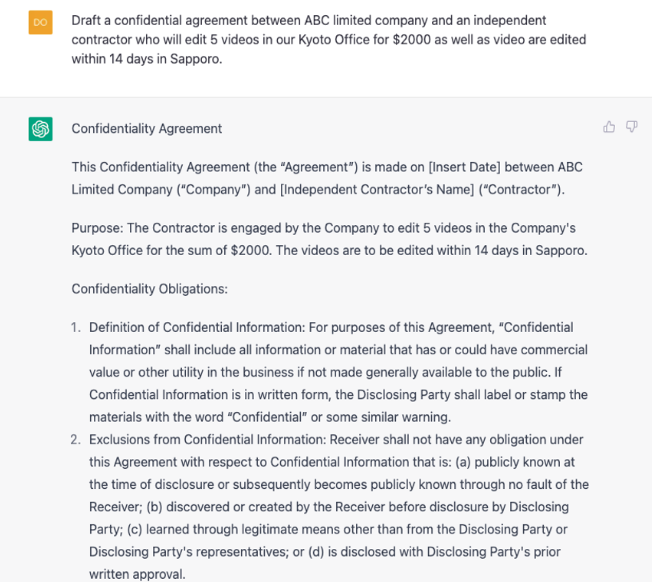
- Draft a contract
Prompt: Draft a [Contract type] between [Party 1] and [Party 2] for [consideration] in [Jurisdiction].
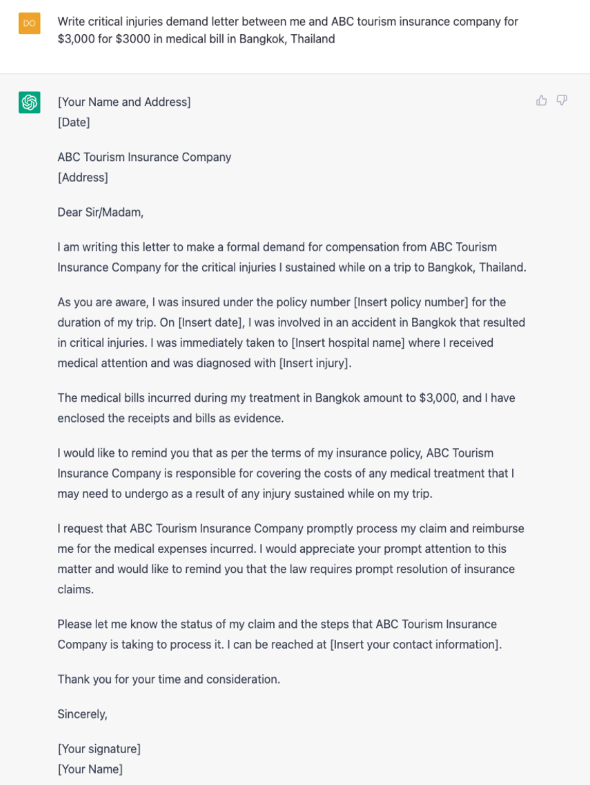
Prompt: Write a demand letter between [Party 1] and [Party 2] for [consideration] for [Injuries] in [Jurisdiction].
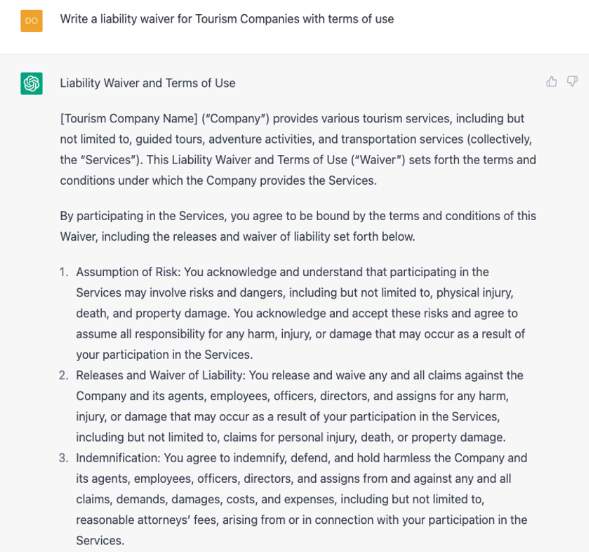
Prompt: Write a liability waiver for [service/product] with [terms/conditions]
- Review Contract
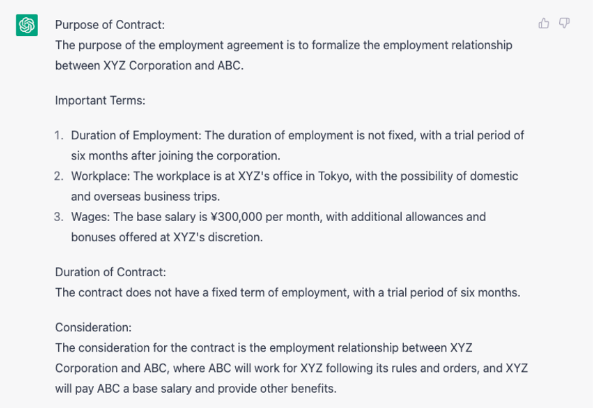
Review the following contract and provide me the purpose of the contract, the 3 most important terms of the contract, the duration of the contract, and what the consideration is for the contract: [copy and paste contract]
Summarize the following contract: [copy and paste contract]
Proofread the following: [copy and paste contract]
To illustrate, here is the main point of the 3-page-length contract after being summarized by ChatGPT.
HR
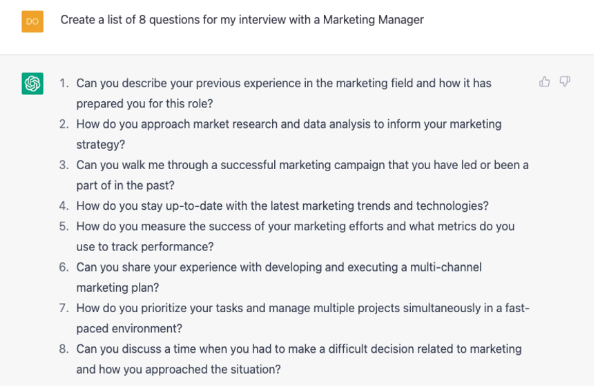
Designing Interview Question:
Prompt: Create a list of [Number] questions for my interview with a [Job Title]
Utility/Employee optimization
Optimize communication of employees (Eg, automate email responses and text translation or change tone or wording of text)
Currently, you can add ChatGPTwriter to your Chrome. Thanks to this extension, it can fasten the writing process, help you write email subjects, fix any typos you might have, etc.
1. Add ChatGPTwriter from the Chrome extension store: https://chrome.google.com/webstore/detail/chatgpt-writer-write-mail/
2. Click the ChatGPT Writer extension button in the Gmail reply box.
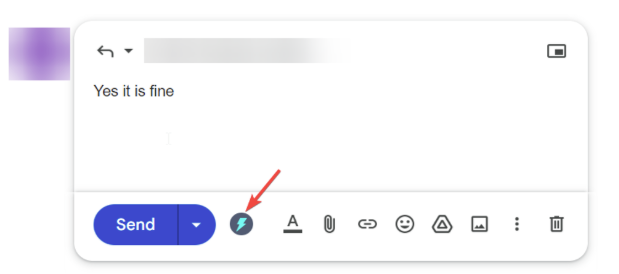
3. Once you have logged into the ChatGPT writer page, in the “Briefly enter what you want to reply to” section, enter a brief summary of the content you intend to write.
4. Click the “Generate reply” button
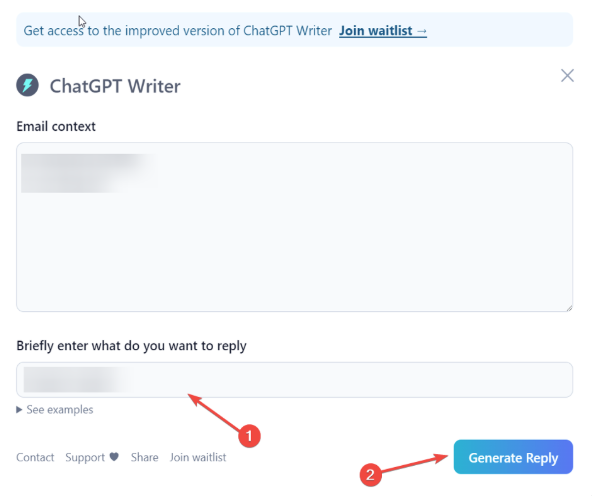
5. After you receive a reply, press the “Insert generated reply” button to copy the response into the email body
Discussion of The Challenges of Using ChatGPT in These Applications
ChatGPT, like any machine learning model, has limitations in its capabilities and performance. Some drawbacks that you should bear in mind when using ChatGPT include the following:
- Marketing: Until now, Google has only accepted Meta Descriptions written by AI. But the remaining part, such as the main content, according to the updated Google Webmaster Guidelines, did not directly mention content generated by AI, but it used the word “Automatically-generated content”, which can be considered spam, followed by exerting a negative impact on your website’s rank.
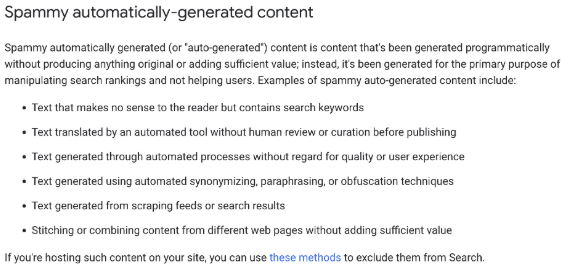
Source: Google Webmaster Guidelines
- Operations (Customer Support,…): Limited output related to generated content. ChatGPT is trained on a huge set of data, but it can produce repetitive or similar responses if the prompt is too similar.
- Data bias: Being trained on a large dataset, ChatGPT may have some biases in understanding and text generation. To illustrate, if the input data has racist content or gender discrimination content, it is not beyond the realm of possibility that ChatGPT can replicate and disseminate these biases in its output.
- Limited interpretability: ChatGPT is a deep learning model, and it is difficult to understand its decision-making process. This hinders identifying and correcting errors.
- Large Data Latency: The Data Set that is used to train ChatGPT is updated to 2021, as a consequence, there are limitations in responding to the latest real-time requests.
You can refer to the list of ChatGPT errors/limitations discovered and aggregated by users here.
Read more: 10 Impressive Features and Drawbacks of GPT-4 – A Closer Look at New Evolutions in AI
IV. CONCLUSION
The capital flowing into OpenAI, which was collectively raised $10bn by Microsoft, suggests that the race to develop Artificial Intelligence is being heated up. Admittedly, ChatGPT still has some limitations. This new AI, always “on,” always “learning,” and constantly “thinking”, will soon challenge and enhance the intellect and experience of even the savviest professionals in every sector. There’s no way to escape the gravitational pull of these new machines and the business models that enable and leverage them. Understanding AI and the skill to use it is one of the key factors for being well-integrated into the uncertain future.
At Relipa, our experienced and tech-savvy engineers always keep up with new trends and have a firm grasp of knowledge about new technology. If you need consultant services related to integrating ChatGPT into your current business, please feel free to contact us. We look forward to hearing from you.
