
As AI adoption accelerates across industries, choosing the right implementation strategy has become just as important as selecting the right model. Based on our experience as one of the most trusted AI development companies, we’ve summarized the capabilities of ChatGPT API (GPT-4) and Whisper API, along with implementation considerations, enterprise use cases, and best practices that help businesses build scalable AI applications.
AI Development Companies’ Insight: Understanding ChatGPT API (GPT-4) and Whisper API
Before evaluating GPT-4 for enterprise AI projects, it’s important to understand what ChatGPT API (GPT-4) and Whisper API offer. Below is an overview of their core capabilities, major improvements, and API features introduced by OpenAI.
ChatGPT API (gpt-4)?
GPT-4 is OpenAI’s multimodal AI model, capable of understanding both text and images. Compared to GPT-3 and GPT-3.5, it demonstrates significantly stronger performance across professional and academic benchmarks, ranking in the top 10% on a simulated bar exam, while GPT-3.5 ranked near the bottom 10%.
Before its release, GPT-4 underwent six months of alignment through extensive internal testing and ChatGPT-based feedback to improve factual accuracy, instruction-following, and safety. Like previous GPT models, it was trained on a combination of publicly available and licensed datasets.
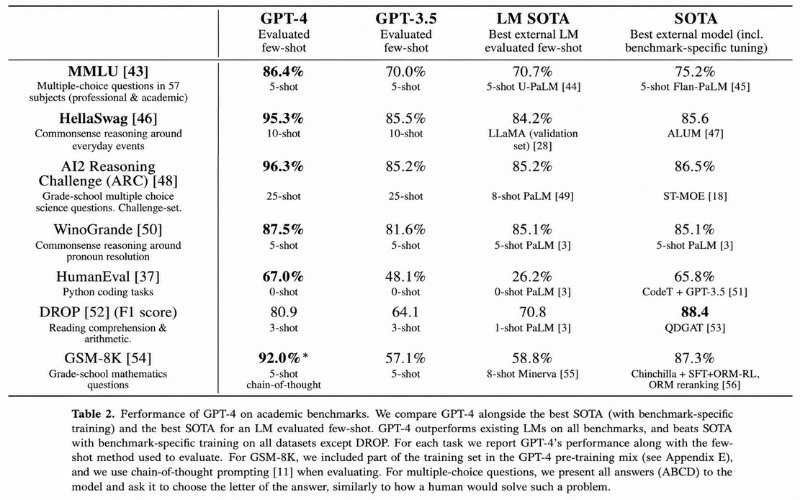
OpenAI collaborated with Microsoft to build a custom Azure-based supercomputer to train GPT-4. According to OpenAI, while the difference between GPT-3.5 and GPT-4 may seem subtle in casual conversations, GPT-4 is significantly more reliable, creative, and capable of handling complex or ambiguous instructions.
One of GPT-4’s biggest advancements is its multimodal capability, allowing it to understand both text and images. For example, it can identify objects in photos, interpret visual context, and answer image-based questions. OpenAI is currently testing this capability with Be My Eyes, enabling visually impaired users to receive AI-powered assistance for everyday visual tasks.
GPT-4 also introduces System Messages, a new API feature that lets developers define the assistant’s role, tone, and behavior through system-level instructions. This makes AI responses more consistent and easier to customize for different business applications.
Despite these improvements, OpenAI acknowledges that GPT-4 is not flawless. It can still generate inaccurate information, make reasoning errors, or express incorrect answers with high confidence, highlighting the importance of human oversight in real-world applications.
API: Traditionally, the GPT model has used unstructured text. This is represented in the model as a series of “tokens”. The ChatGPT model, on the other hand, consumes a series of messages with metadata instead. (Interestingly, under the hood, the input is still rendered (to the model) as a series of “tokens” that the model consumes. The model uses a new format called Chat Markup Language (“ChatML”).
OpenAI has created a new endpoint for interacting with the ChatGPT model.
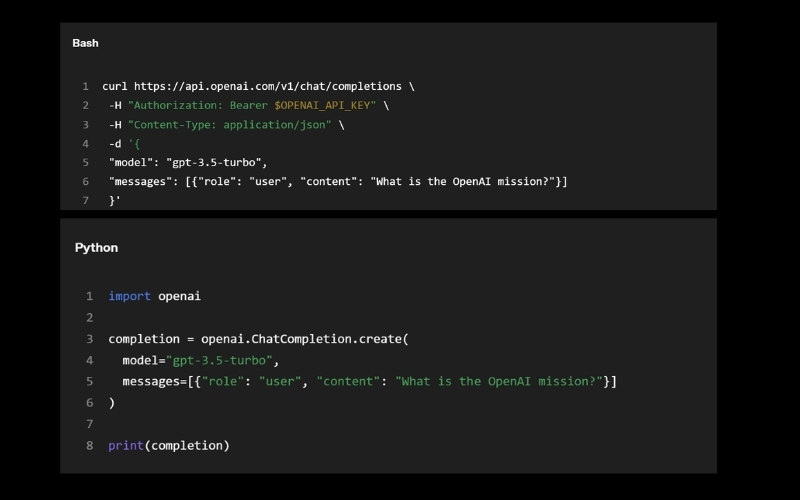
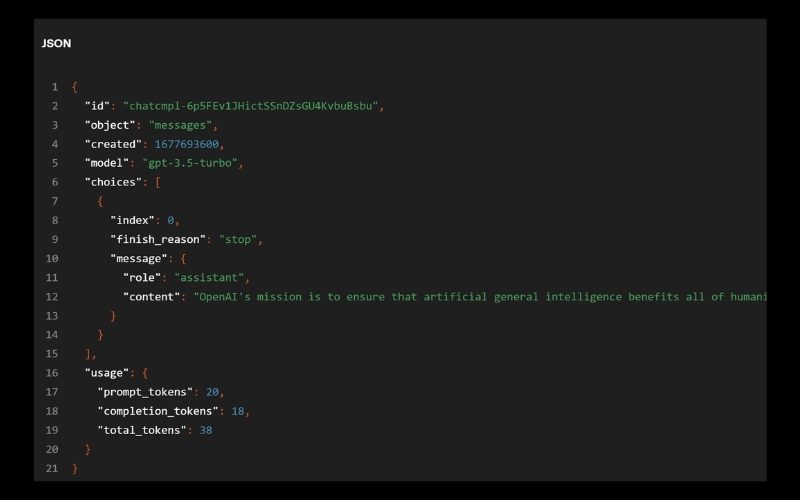
For more information on the ChatGPT API, please refer to the OpenAI chat guide.
Whisper APIs
Whisper, a speech-to-text conversion model that OpenAI open-sourced in September 2022, has been paid tribute to by the IT industry. However, there are still some cases that are difficult to implement at this stage. Also, large v2 models are now available through the API. This gives developers convenient on-demand access for $0.006 per minute. In addition, OpenAI’s highly optimized service stack ensures faster performance than other services.
The Whisper API is available in various formats (m4a, mp3, mp4, mpeg, mpga, wav, webm) through transcription (transcription in the source language) or translation (transcription to English) endpoints.
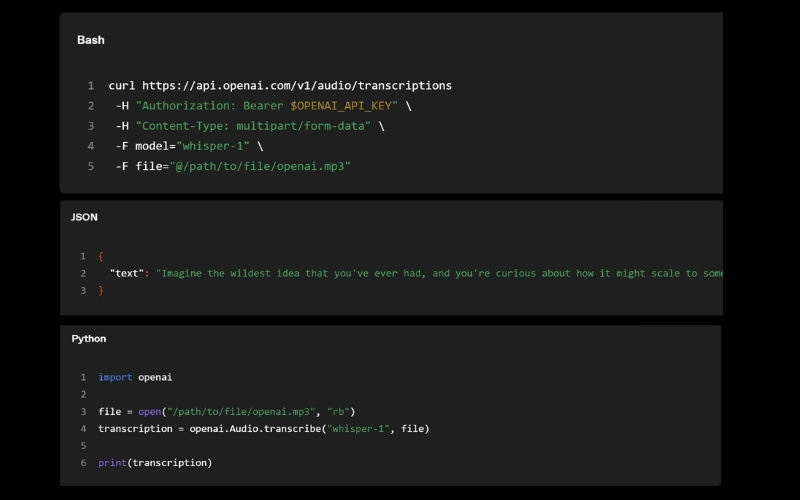
For more information on the Whisper API, please refer to Speech-to-Text Guide
Read more: 10 Impressive Features and Drawbacks of GPT-4 – A Closer Look at New Evolutions in AI
Advantages of GPT-4 and Whisper APIs
Advantage
The advantages of GPT-4 are:
- Look at an image and understand its content
Input: What can I make with these ingredients?

Output:
There are many options for what you can make with these ingredients! Some possibilities include:
- Pancakes or waffles
- Crepes
- French toast
- Omelette or frittata
- Quiche
- Custard or pudding
- Cake or cupcakes
- Muffins or bread- Cookies or biscuits
The most striking change in this versatile machine learning system is that it is “multimodal”. This means that multiple information “modalities” can be understood. ChatGPT and GPT-3 were text-only, readable, and writable, but limited (and inadequate for many applications).
However, when given images, GPT-4 processes them very finely to find relevant information. Of course, you can just tell it to describe what’s in the image, but what’s more remarkable is that the understanding is much deeper than that. An example given by OpenAI makes a joke about a ridiculously large iPhone connector image. And when you work with Be My Eyes, that understanding goes even deeper.
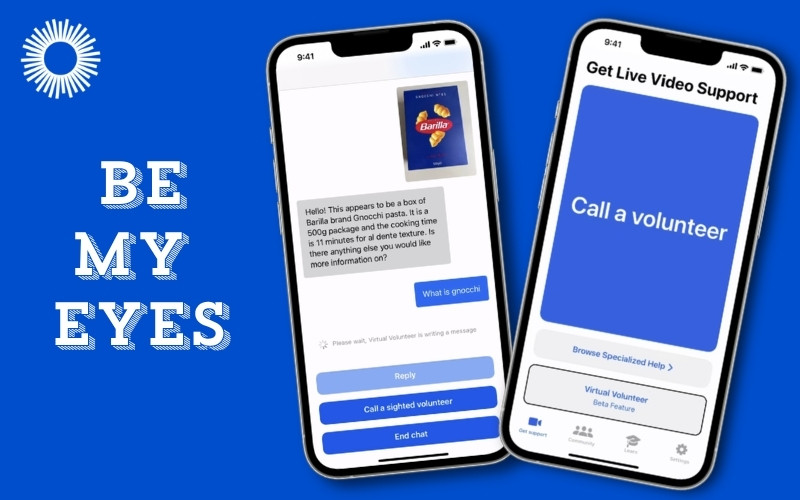
For example, in the Be My Eyes video, GPT-4
- Explain the pattern of the dress
- Identify plants
- Explains how to get to a specific piece of equipment in the gym
- Translate labels and provide recipes
- Map interpretation
And many other tasks. If you ask the right questions, you can see that GPT-4 has a better understanding of what’s in the image by taking in the background and context. For example, you can answer whether the dress shown in the image is suitable for an interview.
- Having long-term memory
Large language models are trained on millions of web pages, books, and other text data, but how to remember all of that when you’re actually conversing with a user? There are limits. GPT-3.5 and older versions of ChatGPT have a limit of 4,096 tokens, which is no more than about 8,000 words or roughly 4-5 pages of a book.
GPT-4, on the other hand, has a maximum token count of 32,768, which is 2 to the 15th power, about 64,000 words, or the equivalent of 50 pages in a book. In other words, you can keep up to 50 pages of content in your memory during conversations and text generation. So, for example, ChatGPT can clearly remember what you said 20 pages ahead, or if you’re writing a story or essay, you can refer back to what happened 35 pages ago.
AI Development Companies often leverage this larger context window when building enterprise AI assistants capable of handling lengthy reports, contracts, technical documentation, and knowledge bases.
- Supporting multiple languages
GPT-4 delivers strong multilingual performance, achieving high accuracy across 26 languages, including Italian, Ukrainian, and Korean. It also performs well in languages it was not specifically trained on, making it a reliable solution for global applications such as multilingual customer support, content localization, and cross-border communication.
The Whisper API is the perfect tool for anyone who needs accurate speech-to-text functionality. Transcribe interviews, create subtitles for your favorite shows, or even develop voice-activated assistants. And it can be used with almost any kind of audio file.
Read more: Maximizing ChatGPT: A Guide to Using and Exploring ChatGPT’s Use Cases
Real-world Use Cases Recommended by AI Development Companies
Duolingo
Duolingo has introduced Duolingo Max, a premium subscription powered by GPT-4, featuring Role Play for AI conversations and Explain My Answer for personalized feedback. According to the Duolingo team, GPT-4 enables more natural, context-aware, and personalized interactions than previous models, making language learning more engaging and effective.
GPT-4 also accelerated product development. Engineers were able to build a working prototype in just one day, reaching about 95% completion before manually fine-tuning the remaining details. This significantly reduced development time while improving the overall learning experience.
Speak
Speak is an AI-powered language learning app that focuses on speaking and builds the best learning pathways. Speak is the fastest-growing English app in South Korea and has already rolled out a new AI-speaking companion product using the Whisper API globally. Whisper’s human-level speech accuracy enables true open-ended conversation practice and highly accurate feedback for language learners of all levels.
AI Development Companies’ Guide to Implementing ChatGPT API and Whisper API
To get access to the GPT-4 API, visit the OpenAI waiting list (this uses the same ChatCompletions API as gpt-3.5-turbo). OpenAI will start inviting a limited number of developers from March 15, 2023, and plans to gradually scale up while balancing demand and capacity. For researchers studying AI’s social impact or AI integrity issues, you can also apply for grant access through the Researcher Access Program.
Once you have access, you can send text-only requests to the GPT-4 model (image input remains in limited alpha). Whenever OpenAI creates a new version, OpenAI automatically updates to the recommended stable model (we call the current version gpt-4-0314 and support it until June 14, 2023).
Get API Key
Before integrating GPT-4 into production systems, Relipa (one of the most experienced AI development companies) recommend securing API credentials and following OpenAI’s authentication best practices.
To use the ChatGPT API, you need to get an API key.
- Visit the OpenAI website. If you don’t have an account, go to your OpenAI account sign-up, and if you already have one, log in to get it.
- After logging in go to the Account API Keys section.
- From this screen, click the Create new secret key button to create a new secret key. The private key is displayed only once. Be sure to copy it. If you forget the copy, delete the old key and create a new one.
Do not share your API key with others or expose it in your browser or other client-side code. To ensure the security of your account, OpenAI may automatically delete API keys that are found to be public.
API Endpoints for OpenAI
OpenAI’s API endpoints are URLs that developers can use to send requests and receive responses from OpenAI’s APIs, which provide access to various language models, including GPT-3. The exact endpoint URL may vary depending on the specific API version and model used, but generally follows a similar format including base URL, version number, and endpoint path.
For example, the base URL for OpenAI’s API is typically https://api.openai.com/ and the version number may be included in the URL path, such as v1 for the first version of the API. The endpoint path points to the specific API endpoint to be accessed, such as /completions for requesting text completions from the language model.
Overall, the full API endpoint URL for accessing OpenAI’s API is: https://api.openai/com/v1/completions
Common parameters required in API requests
Of course, the exact endpoint URL and required parameters may vary depending on the specific use case and API function being accessed.
The required parameters by OpenAI’s API depend on the API endpoint used and the type of request sent. However, there are common parameters that most API requests require, specifically:
- Model: This parameter specifies the name or ID of the language model to use for the generated response. For example, the GPT-3 model can be accessed using the parameter values ’davinci’ or ‘curie’, depending on the specific version of the model being used. As of this writing, the models that support ChatGPT are gpt-4 and gpt-4-0314. Developers using GPT-4 models always get stable models recommended by OpenAI.
- Prompt: This parameter is used as a starting point to provide input text to the language model and generate a response. The prompt text should be formatted according to the requirements of the API endpoint used.
- API_key: This parameter is used to authenticate API requests and must be included in the request header. An API key is a unique identifier provided to developers who have registered with OpenAI and have been approved for API access.
Other parameters depend on the API endpoint used, such as the temperature parameter to control the randomness of the generated text and the max_tokens parameter to set the maximum length of the generated text. It is important to refer to the API documentation for the endpoint you are using to ensure all required parameters are included in your API request.
Setting up a Development Environment for Using OpenAI APIs
To set up a development environment for using OpenAI APIs, you can follow these general steps:
- Sign up for an OpenAI API Key: Before you can use the OpenAI APIs, you need to sign up for an API key. Go to the OpenAI website and follow the instructions to sign up for an API key.
- Choose a Programming Language: Choose a programming language that you are familiar with and that has a client library for the OpenAI API. Some popular programming languages for working with the OpenAI API include Python, JavaScript, Ruby, and Java.
- Install the Client Library: Install the client library for the OpenAI API for your chosen programming language. You can usually install the client library using a package manager, such as pip for Python, npm for JavaScript, or gem for Ruby.
- Create a New Project: Create a new project or open an existing project in your chosen programming language.
- Import the Client Library: Import the OpenAI client library into your project. The exact command or syntax for importing the library will depend on your chosen programming language and the specific client library you are using.
- Set up your API Credentials: Set up your API credentials by storing your API key in a secure location, such as an environment variable or configuration file. Make sure that you do not share your API key with anyone or expose it in your code.
- Make API Calls: Use the OpenAI client library to make API calls to the OpenAI API. Refer to the OpenAI API documentation for information on how to structure API requests and responses.
- Test your Code: Test your code to ensure that it is working as expected. You can use the OpenAI Playground to test your code and explore the OpenAI API functionality.
- Deploy your Code: Deploy your code to a production environment, if necessary.
These are the general steps for setting up a development environment for using OpenAI APIs. The specific steps may vary depending on your chosen programming language and the client library you are using. For example, send a request to the API in Python to generate text with a given temperature and the maximum number of tokens based on the prompt and model provided.
- Get the OpenAI API key
- Install Python and pip: Python and Python packages. Install pip, the installer. Python can be downloaded from the official website and pip is usually included in the installation.
- Install OpenAI API client library: OpenAI provides a Python client library to access the API. You can install the library using pip by running the following command in your terminal or command prompt.
- API key setup: API keys can be set up by defining them as environment variables in your code.
- Testing API requests: After setting up your API key, you can test your API requests by sending a request to the API endpoint with the required parameters. Below is an example of generating text using the GPT-3 model.
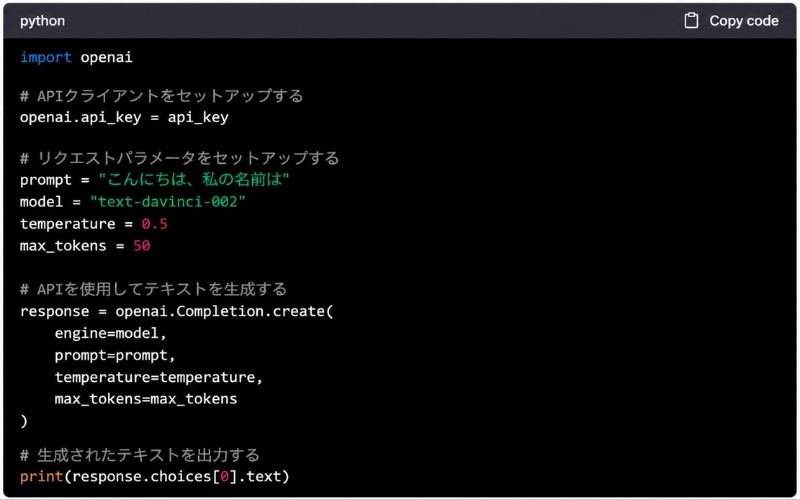
Reference: OpenAI
This code sends a request to an API that generates text based on the specified prompt and model, and outputs the generated text. There are various options for API endpoints, and there are restrictions on the models and parameters that can be used. After reading the API documentation, we recommend that you review the available options before submitting your request.
By following the steps above, you can set up a development environment for using OpenAI’s API in Python. APIs can be used to automate a variety of tasks such as text generation, translation, language understanding, sentence summarization, and more.
ChatGPT API (GPT-4) and Whisper API Pricing
ChatGPT API (GPT-4) and Whisper API Usage Fee
The usage fee for ChatGPT API (GPT-4) has been reduced.
For 8000 tokens (e.g. gpt-4 and gpt-4-0314) the prices are:
- $0.03 per 1k Prompt Tokens
- $0.06 per 1k sample tokens
For models with 32k context length (e.g. gpt-4-32k and gpt-4-32k-0314) the prices are:
- $0.06 per 1k Prompt Tokens
- $0.12 per 1k sample tokens
OpenAI is still improving model quality for long contexts and welcomes feedback on its performance in your use case. Based on capacity, OpenAI is processing requests for the 8K and 32K engines at different rates, so you may be able to access them at different times.
Usage charges for the Whisper large-V2 model are $0.006 per minute. OpenAI CEO Sam Altman previously estimated the computing cost of each chat at a few cents, but the cost has been significantly reduced this time around.
Tokens Do Not Necessarily Match the Number of Words in a Sentence
A token is a unit used in natural language processing (NLP) that represents a group of meaningful sequences of letters or symbols. It includes words, but it also includes punctuation marks, symbols, and other sequences of characters.
Consider the following sentence: “The quick brown fox jumps over the lazy dog.”
- Tokens: In natural language processing, a token is a sequence of characters that represents a single meaningful unit of text. For example, in the sentence above, the tokens would be: “The”, “quick”, “brown”, “fox”, “jumps”, “over”, “the”, “lazy”, and “dog.” Tokens are often used as inputs to machine learning models, where each token is mapped to a numerical representation (such as an integer or a vector) for processing.
- Text: Text refers to the entire body of written or spoken language, including all its constituent tokens. In the context of natural language processing, the text is often analyzed and processed to extract meaningful insights or generate new text. For example, a machine learning model might be trained on a large corpus of text data to learn how to classify or generate new text based on patterns in the input data.
In summary, tokens are individual units of meaning within the text that are often used as inputs to machine learning models, while text refers to the entire body of written or spoken language that is processed and analyzed in natural language processing applications.
Summary
GPT-4 and Whisper API have significantly expanded the possibilities for enterprise AI, from intelligent assistants and multimodal search to speech recognition and workflow automation. However, successful implementation requires careful planning around architecture, scalability, security, and cost optimization.
As one of the most experienced AI development companies, Relipa helps organizations evaluate business requirements, select the right AI technologies, and build production-ready AI solutions that integrate seamlessly with existing systems. Whether you’re exploring an AI proof of concept or developing enterprise-scale applications, having the right technical strategy can dramatically improve long-term success.
Relipa
Relipa is a Vietnam-based software development company established in April 2016. After two years of growth, our Japanese branch – Relipa Japan – was officially founded in July 2018.
We provide services in MVP development, web and mobile application development, and blockchain solutions. With a team of over 100 professional IT engineers and experienced project managers, Relipa has become a reliable partner for many enterprises and has successfully delivered more than 500 projects for startups and businesses worldwide.
