

Most companies come to AI workflow automation services after a promising demo. An AI model reads a few invoices or answers some support questions, and the potential looks obvious. The harder part comes later, when the workflow has to deal with real documents, connect to the ERP or CRM and run every day without someone checking every result. At that point, success depends less on the model and more on how the process is chosen, prepared, secured and maintained.
Where manual processes break, and why tools alone don’t fix them
Most businesses already automate the easy parts of their work, such as approvals, notifications and data transfers between popular apps. What stays manual is the work that starts with difficult inputs: a scanned invoice, a customer email, a supplier PDF or a question someone has to answer by searching internal documents.
That work carries costs that rarely appear in one report. Staff retype the same data into several systems, errors surface weeks later, and requests wait while the person responsible is away. When volume grows, the only way to keep up is to hire more people for work nobody wants to do.
Rule-based automation, RPA and no-code tools solve part of the problem, but they depend on structured inputs, stable screens and ready-made connectors. When a document arrives in a new layout or a system has no connector, the workflow stops and the case goes back to a person.
Adding AI is also where many projects stall. In June 2025, Gartner predicted that over 40% of agentic AI projects will be canceled by the end of 2027 because of escalating costs, unclear business value or inadequate risk controls. The model is rarely the problem. The difficulty lies in taking a process from a promising demo to a workflow that runs every day. If you need a primer on the concept first, see our guide to AI workflow automation for enterprises.
How AI workflow automation services take a process from manual to intelligent
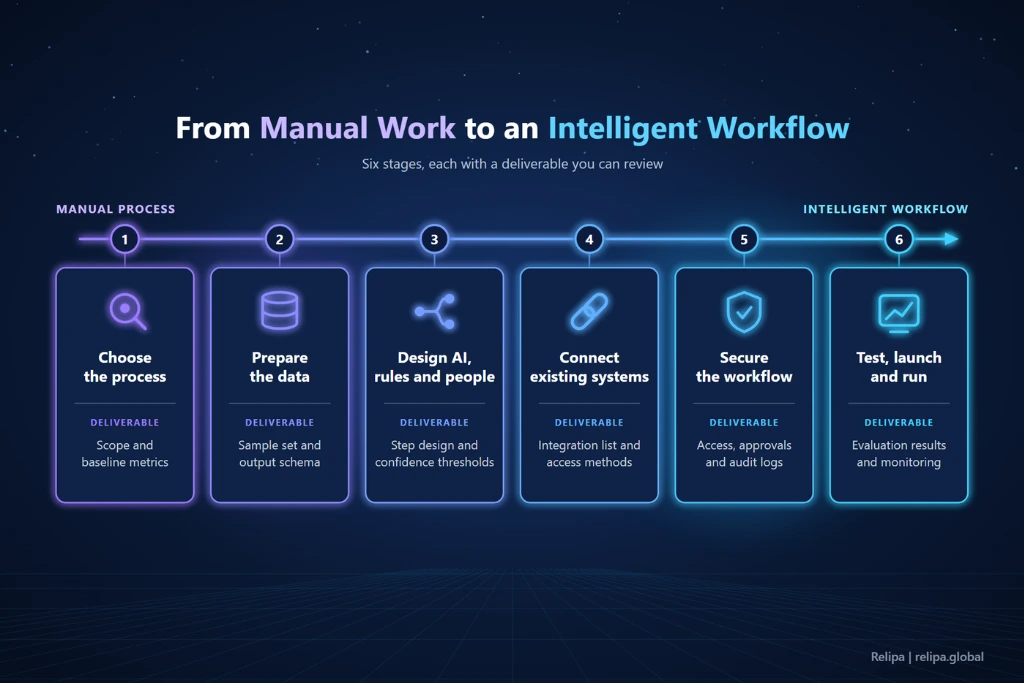
AI workflow automation services usually take a process through six stages: choosing the process, preparing the data, designing where AI and people fit, connecting existing systems, securing the workflow, and testing and running it in production. Each stage should end with something the business can review, such as a written scope, a data sample, a workflow design or test results, before the next one begins. The sections below walk through each stage, where projects tend to get stuck and how real projects handled it.
Stage 1: Choosing the right process to automate
The best first process is frequent, repetitive, built around a recognizable input and output, and owned by someone who will use the result.
Start by mapping how the work actually runs, not how process documents say it should. Follow a few real cases from start to finish and record volume, handling time, rework rate and the most common exceptions. These numbers become the baseline against which the results of AI workflow automation services are measured later. Then score each candidate process from 1 to 3 on six criteria: volume, repetitiveness, input patterns, rule clarity, data and system access, and the cost of an error. Start with the highest total. Processes that are about to be redesigned, depend on a system being replaced or run only a few times a quarter should wait.
Where projects get stuck: The scope is too broad, such as “automate finance operations,” or there is no baseline, so nobody can later show whether the automation made a difference.
Example: Invoice entry is a common first choice. For an AI-powered invoice processing platform, interviews with accountants, auditors and finance administrators revealed repetitive data entry, inconsistent invoice formats and slow monthly reporting. High volume and a measurable result made it a strong candidate.
Key factor: Start from a process whose current performance has been measured, not from a list of AI features.
Stage 2: Preparing the data the workflow will run on
AI steps are only as reliable as their inputs. In real operations, the same document type arrives in dozens of layouts, fields are missing or smudged, and the same supplier appears under different names in different systems.
This stage turns “process the documents” into a buildable specification. It involves collecting a representative sample of real inputs, defining the output schema, setting rules to normalize dates, currencies and names, and deciding what happens when a field cannot be read.
Where projects get stuck: The AI is tuned on a few clean samples and fails when production data arrives, while rare edge cases end up consuming most of the review time.
Example: In the invoice processing platform, OCR combined with generative AI reads receipts, bills and delivery orders in different layouts, separates totals from unit prices and maps the fields to the template accountants already use. In an AI data collection system, product data from marketplace APIs and catalog PDFs is standardized into fields configured per product category, and duplicate records are merged.
Key factor: Agree on real data and the output schema before choosing a model.
Stage 3: Designing where AI, rules and people fit
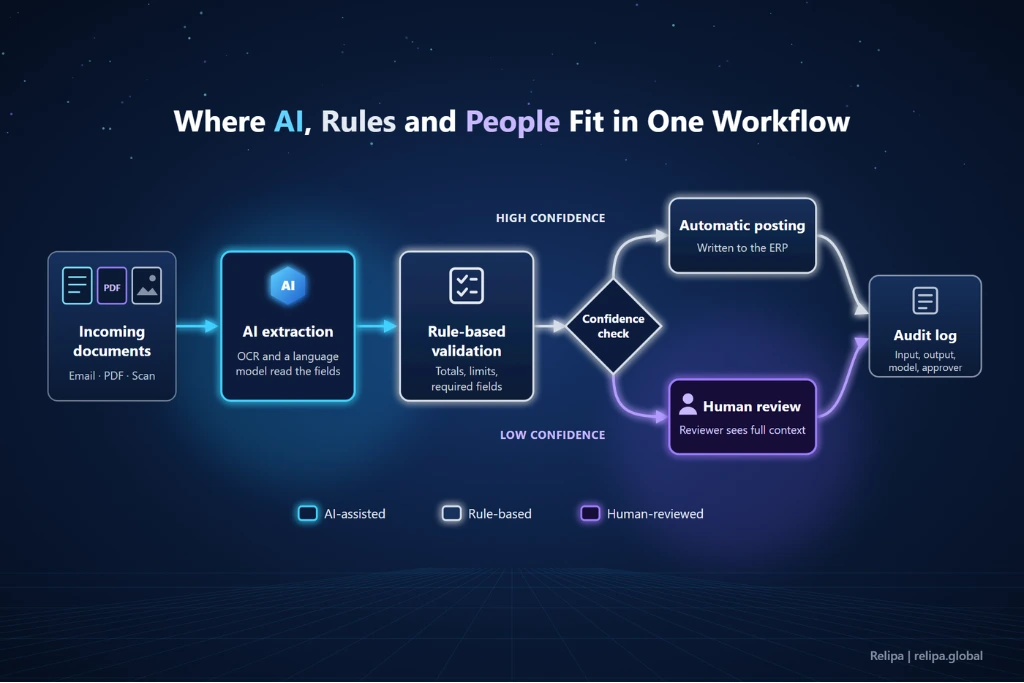
This is where AI is actually integrated into the workflow. Each step is assigned to one of three types:
- Rule-based: The step must behave the same way every time, such as checking an amount against a limit.
- AI-assisted: The step involves unstructured input or interpretation, such as reading a document or classifying a request.
- Human-reviewed: The step has high business impact, or the AI is not confident enough to proceed alone.
In AI-assisted steps, AI usually reads unstructured inputs, classifies and routes work, retrieves answers from approved internal sources through retrieval-augmented generation (RAG), or recommends the next action. For actions involving money, contracts or customer data, AI should recommend while rules or people confirm. Confidence thresholds decide which cases pass through automatically and which go to a reviewer, along with the context needed to decide quickly.
Where projects get stuck: Users don’t trust the AI and recheck every output, which cancels out the time saved, or they trust it too much and errors reach finance systems and customers.
Example: A customer support assistant built on RAG answers only from the client’s FAQs, manuals and support history, and checks whether the retrieved information is reliable before replying. When it isn’t, the conversation moves to a fallback flow. The conditions for handing over to a human operator were agreed during requirements analysis.
Key factor: Every step has a clear owner, whether that owner is a rule, a model or a person.
Stage 4: Connecting the workflow to existing systems
An AI step creates value only when its result reaches the systems where work happens: the ERP, the CRM, the helpdesk, a database or a chat tool. Integration is often the largest share of the effort and the point where no-code tools reach their limits.
The work here is to list every system the workflow reads from and writes to and choose an access method for each. An API comes first, then database access or file exchange, with screen automation as a last resort. When scoping AI workflow automation services, each integration should be estimated separately, and the workflow should sit where users already work.
Where projects get stuck: Older systems have no API or documentation, and timelines slip once this is discovered mid-project. In those cases, an adapter layer or a plan aligned with legacy system modernization keeps the automation from breaking with every change.
Example: An AI document search assistant runs inside Microsoft Teams and re-indexes documents automatically when they change, so employees get current answers without switching tools.
Key factor: The workflow runs inside the tools people already use and fits the systems already in place.
Stage 5: Securing a workflow that acts inside your systems
Once an AI workflow can read company documents and write to business systems, it becomes part of the security perimeter. The OWASP Top 10 for LLM Applications 2025 ranks prompt injection as the number one risk and sensitive information disclosure as number two. It also lists excessive agency, where a model has more permissions than its task requires, among the top ten. In workflow automation, malicious instructions can arrive inside the very emails and PDFs the workflow processes.
The controls to design in are:
- Least-privilege access: Each workflow gets its own service account, with read and write permissions kept separate.
- Credential management: API keys and tokens live in a secrets manager, never in workflow definitions or prompts.
- Untrusted inputs: Document and email content is kept separate from the instructions the model follows.
- Human approval: Payments, changes to customer records, external messages and deletions require confirmation.
- Data isolation and retention: Data is separated between clients or departments, personal data is masked and logs have a retention period.
- Audit trail: Every action is logged with its input, output, model version and approver.
Where projects get stuck: Security is left until the end, and the compliance team blocks a launch built on an architecture that is hard to change.
Example: In the customer support assistant, data management, customer data isolation, personal information protection and access control can be configured for each environment.
When you compare AI workflow automation services, ask to see how these controls are designed for your process. Security built in during development costs far less than a fix after an incident.
Key factor: Security is part of the architecture, not a line item marked “included.”
Stage 6: Testing, launch and keeping it running
An AI workflow needs more than functional testing. It needs evaluation on real cases: correct values, correct routing and correct handling of exceptions.
Before go-live, build an evaluation set from representative inputs, measure accuracy per field or decision, and run the workflow in parallel with the manual process until it meets a threshold set by the business owner. Rerun the same evaluation after every change to prompts, models or rules.
After launch, automation degrades quietly. A supplier changes its invoice layout or a model version behaves differently, and accuracy slips. A dashboard tracking volume, success rate, exceptions and processing time, plus alerts and named owners, keeps this visible. Ongoing maintenance and running costs such as model usage and hosting should be budgeted from the start. We cover these less visible items in the hidden costs of AI development services.
Where projects get stuck: Launch day is treated as the finish line, and nobody reviews exceptions or checks whether accuracy still meets the target.
Example: The AI data collection system compares extraction results against reference data, reprocesses only failed segments instead of whole batches, and shows crawl status and processing progress on a dashboard.
Conversational workflows need the same discipline. In an AI customer support project built on Amazon Bedrock, testing ran throughout development rather than only before launch. It covered document retrieval, answer generation, conversation behavior and integration with the client’s systems. After each round, findings were shared with the client, and retrieval and configuration were adjusted based on the results. The outcome was a support agent that answers consistently from existing documentation, while support staff spend their time on the complex cases.
Key factor: The same evaluation runs after every change, and someone owns the workflow after launch.
Before and after: what changes when a process becomes intelligent
Comparing the same work before and after automation shows where the value comes from.
| Process | Before (manual) | After (intelligent workflow) |
| Invoice processing | Accountants type data from receipts and bills into spreadsheets | Invoices are uploaded in bulk, fields are extracted and mapped to the template, and spending questions are answered in plain language |
| Product catalog updates | Data is entered manually or captured with screenshot tools | Data is collected on a schedule, standardized, deduplicated and monitored |
| Customer support | Staff search FAQs and past tickets for repetitive questions | Answers come from approved content, and uncertain cases go to a person |
| Internal knowledge search | Employees search folders or ask colleagues | Employees ask in Microsoft Teams and get answers from current documents |
The common thread is that work is handled as it arrives, data is captured once instead of retyped, and every case follows the same rules and sources. The same team can absorb higher volume because it reviews exceptions rather than every item. Each step is logged, which makes audits simpler than with work spread across inboxes.
