
LLM application development is how businesses turn a large language model into a working tool inside a real process, connected to company data, existing systems and controls that keep its answers reliable. It is the step that separates an impressive AI demo from something employees and customers rely on every day, and the model itself is rarely what decides the outcome. What decides it is the work built around the model, and which business problems that work is aimed at.
What is an LLM?
A large language model (LLM) is an AI model trained on huge amounts of text to understand and generate human language. It can read a question written in everyday words, summarize long documents, draft replies and reports, and pull names, dates or amounts out of unstructured text. Tools such as ChatGPT, Claude and Gemini are built on models of this kind.
What an LLM cannot do on its own matters just as much for a business. It does not know your products, policies or customers unless that information is given to it with each request. It can state a wrong answer with full confidence. It is unreliable at exact calculations and cannot keep records the way a database does. And it has no access to the systems where work actually happens, such as a CRM, an ERP or a shared drive. These gaps explain why typing questions into a chat window rarely changes how a company operates.
What role does LLM application development play?
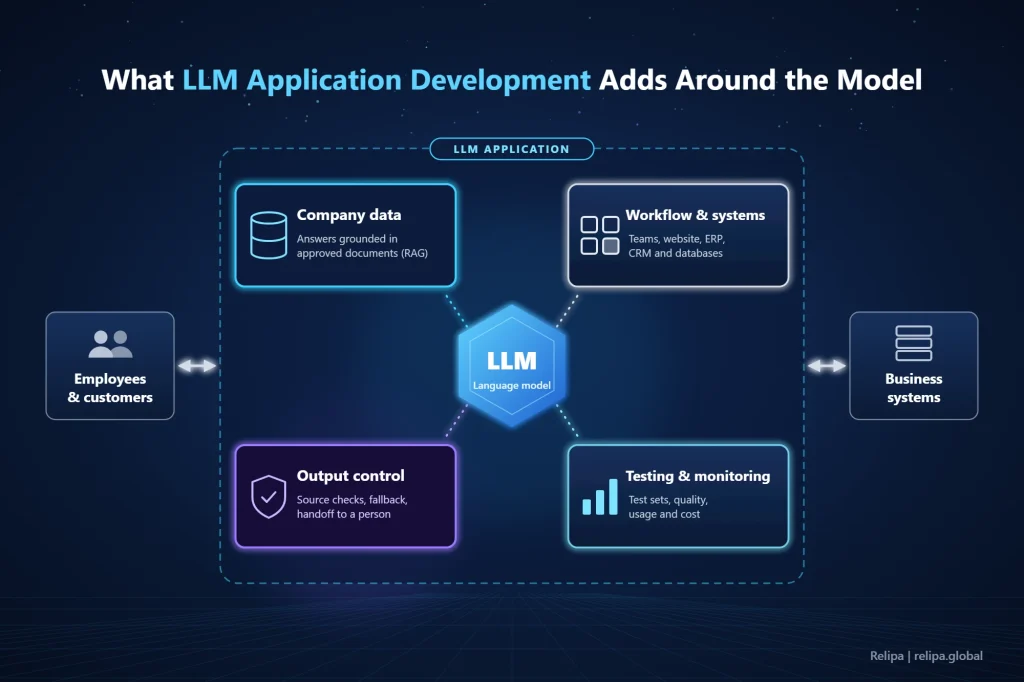
LLM application development closes the gap between what a model can do and what a business process needs. It connects the model to the company’s own data, builds it into the tools people already use, controls what it says and does, and measures whether it is actually helping. Four pieces of work make that happen.
- Grounding answers in company data: The most common approach is retrieval-augmented generation (RAG). Before the model answers, the application searches approved documents for the relevant passages and passes them along, so the answer comes from your content instead of the model’s general knowledge. When documents change, the search index has to change with them.
- Fitting into the workflow: A useful application lives where the work happens, such as a website, Microsoft Teams or an internal system, and connects to the databases and services needed to finish a task rather than only describe it.
- Controlling the output: The application checks whether an answer is supported by the retrieved sources, validates the format before data moves into another system, and decides when to say it doesn’t know or hand the case to a person.
- Measuring and maintaining: Before launch, the application is tested against real questions with known answers. After launch, quality, usage and cost are monitored, because documents, users and model versions keep changing.
Fine-tuning, which retrains a model on your own examples, is often assumed to be the first step, but it rarely is. It helps when a model must follow a consistent style, a fixed output format or a narrow classification task. It is a poor way to keep a model up to date with facts that change, because every change would mean training again. For most business applications, RAG and well-designed instructions get further, faster, and fine-tuning is added later only if testing shows a clear gap.
The choice of model matters too, though less than most teams expect. Many applications use more than one: a smaller, faster model to classify or route requests, and a stronger one for complex reasoning or long documents. Keeping the model behind a simple internal interface lets the team switch providers when prices, policies or quality change, as long as the test set is rerun after every switch.
None of this shows up in a demo, which is why many AI pilots look promising and then stall. Whether an LLM project creates business value depends far more on these pieces of work than on which model sits underneath.
How LLM application development differs from traditional software development
LLM application development follows the same engineering basics as any software project, but a few differences change how the work is planned, tested and budgeted. Teams that treat an LLM feature like an ordinary feature tend to discover these differences after launch, when they are more expensive to fix.
The first difference is that output is not fixed. The same question can produce slightly different answers, and a small change to an instruction or a model version can shift behavior across hundreds of cases. Quality therefore cannot be proven with a handful of pass-or-fail tests. It is measured across a set of real questions with expected answers, and that set is rerun every time something changes.
The second is where the logic lives. In traditional software, behavior is defined in code. In an LLM application, much of it sits in the instructions given to the model, in the documents the system retrieves and in the model itself. These need versioning and review in the same way as code, or nobody can explain why an answer changed from one week to the next.
The third is how failures look. A traditional bug usually produces an error message. An LLM failure produces a fluent, plausible answer that is wrong, and users may act on it before anyone notices. That is why output checks, source references and handoff rules are part of the design rather than extras added at the end.
The last is cost. Most model providers charge by usage, so running cost grows with the number of requests and with how much text is sent in each one. A feature that costs very little in a pilot can become a significant monthly bill at full scale, which makes cost per request a figure to estimate during design, not after the first invoice arrives.
How LLM applications solve real business challenges
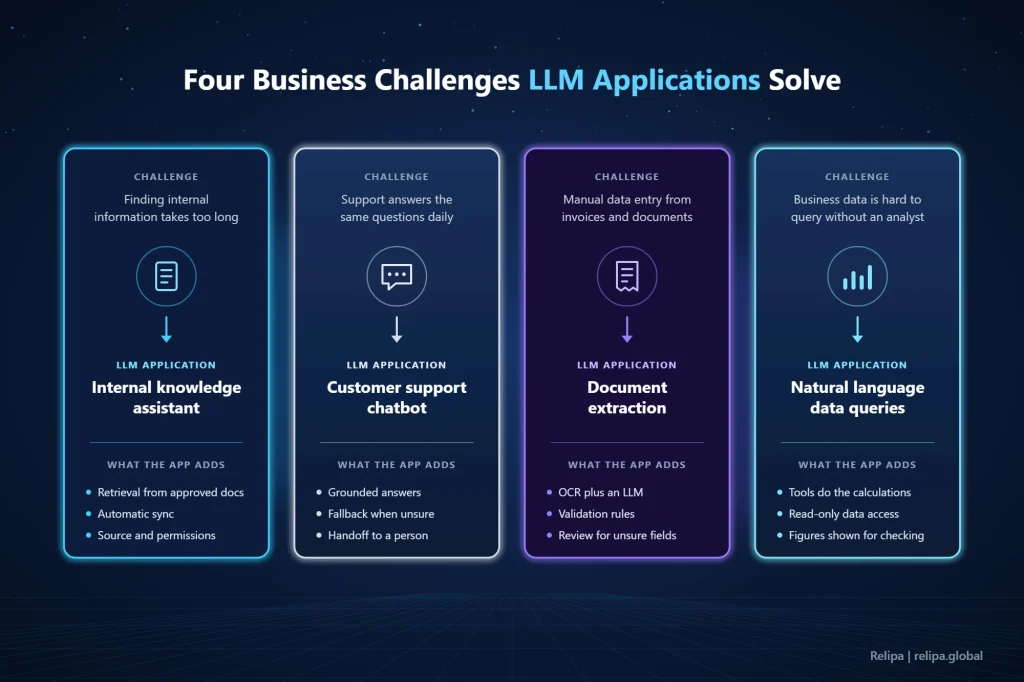
LLM applications pay off where work depends on reading, searching or writing language at volume. The four cases below are where LLM application development most often delivers in operations and customer-facing teams, and each one shows what the model handles, what the application has to add and what needs to be done right.
Finding internal knowledge
In most companies, policies, procedures and technical documents are spread across shared drives and wikis, written in different styles and kept in several versions. Employees lose time searching, act on outdated files or keep asking the same senior colleagues, and onboarding depends on managers repeating themselves.
An internal knowledge assistant lets staff ask in plain language and returns an answer drawn from approved documents, with the source attached. In an internal document search assistant built into Microsoft Teams, employees query quality and information security management documents without leaving the tool they use all day. Semantic search matches questions to content even when the wording differs, and the knowledge base updates automatically when documents are added or changed, so answers stay current without manual upkeep.
Two details decide whether staff trust such an assistant. Answers need to show which document and version they came from, so people can check them in seconds. And retrieval has to respect the same permissions as the source folders, otherwise the assistant becomes a shortcut to documents some employees should never see. When two documents contradict each other, the fix belongs in the content itself, not in the instructions given to the model.
Handling routine customer support
Support teams spend much of their day on repeated questions about features, orders and policies while complex cases wait. Putting a general model in front of customers creates a different risk: a confident wrong answer about a price or a refund rule, and no way to reach a person when the bot gets stuck.
A support chatbot built as an LLM application answers only from the company’s FAQs, manuals and past tickets, and it knows when to stop. In a customer support chatbot built on Amazon Bedrock Knowledge Bases, the system checks whether the retrieved information is reliable enough before replying. If it isn’t, the chatbot avoids an unsupported answer, switches to a fallback flow and can transfer the conversation to a human operator.
Handoff rules are worth settling during requirements rather than after launch: which topics always go to a person, such as complaints or billing disputes, which signals trigger a transfer, such as two failed answers in a row, and what the customer sees outside business hours. When a conversation is handed over, the transcript should go with it so customers never have to repeat themselves. Getting these rules right during development is what keeps customers using the bot after launch, a point covered further in why support chatbots get abandoned.
Processing invoices and documents
Accounting and back-office teams still retype data from invoices, receipts and forms into spreadsheets or ERP systems. Layouts differ by supplier, some documents are scanned or handwritten, and small errors such as swapped digits end up in monthly reports.
Here the LLM works alongside OCR. OCR reads the characters, while the model understands what they mean: which figure is the total and which is a unit price, or which line holds the tax amount. The application then validates the fields and maps them to the company’s own format. In an invoice processing platform that combines OCR with Gemini models, users upload invoices in bulk and receive date, total, VAT, supplier and category in a client-defined template that can be exported to Excel for accounting or audits.
Validation is what makes extraction safe to automate. The application can check that line items add up to the total, that the tax amount matches the rate, and that the supplier exists in the company’s master data. Fields that fail these checks, or that the model is unsure about, go to a person for review instead of flowing straight into the accounting system.
Answering questions from business data
Managers often need quick answers, such as total spending last month or which cost category grew fastest, but the data sits in systems only analysts know how to query. Asking a model to calculate the figures itself is risky, because it can produce numbers that look plausible and are simply wrong.
The safer design splits the work: the LLM interprets the question, and tools run the database queries and calculations. The same invoice platform includes an AI agent that answers questions about the extracted invoices in plain language by calling tools to query the data, aggregate it and compute percentages, then replying in text or tables. Applications in which a model calls tools across several steps are usually built as AI agents, and the choice of agent framework affects how easily a team can control and troubleshoot them later.
Two safeguards make this usable for managers. The application should reach data only through read-only views limited to what each user is allowed to see. And it should show which figures, filters and time range it used, so a surprising answer can be checked rather than taken on trust.
Security and data risks to plan from the start
An LLM application that touches company or customer data has to be designed on the assumption that the model can be misled or mistaken. The OWASP Top 10 for LLM Applications 2025 lists the main risks, and most of them are handled through the application’s design rather than through the model itself.
Three risks deserve attention in almost every business project. The first is sensitive information disclosure: an assistant that can retrieve from every document may reveal HR, finance or customer content to people who should not see it, so retrieval must follow the same permissions as the source systems. The second is prompt injection, where a message or an uploaded file contains instructions that change the assistant’s behavior. Careful wording of the model’s instructions does not fully prevent it, so the real defense is limiting what any single request can reach. The third is excessive agency: an assistant allowed to change orders or send emails needs minimal permissions and human approval for anything that modifies data.
Cost belongs on the same list. OWASP also names unbounded consumption, because heavy or abusive use can drive up usage-based model bills and slow the service, which makes usage limits and cost alerts part of the security design. In the customer support chatbot described above, data access management, customer data isolation, personal information protection and access controls are configured for each environment, so one customer’s content never answers another customer’s question.
How to start an LLM application project
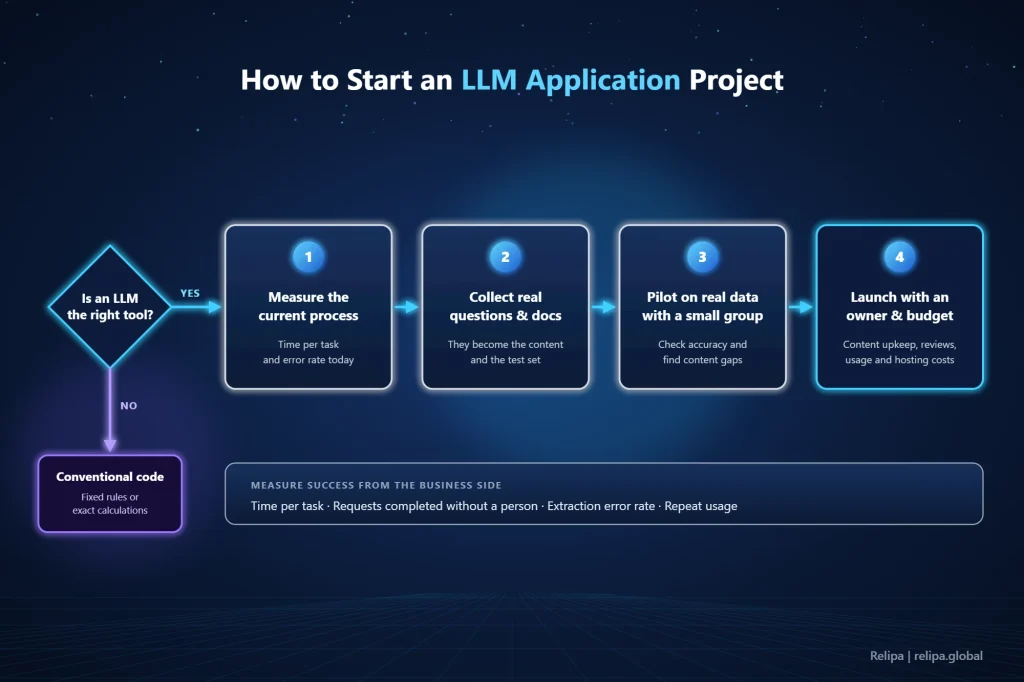
Many stalled projects in LLM application development started from the technology rather than from a problem. Start instead with one frequent, language-heavy process where the pain is easy to measure, and check first whether an LLM is the right tool at all. Tasks with fixed rules or exact calculations, such as tax rules or invoice totals, are cheaper and more reliable in conventional code. Many good applications combine both, letting the model handle language while regular code handles rules and numbers.
When an LLM does fit, a short sequence keeps the project tied to results:
- Measure the current process: Record how long the task takes and how often errors occur, so the outcome can be compared later.
- Collect real questions and documents: Actual tickets, files and queries from the people doing the work become both the content of the application and its test set.
- Pilot on real data with a small group: Real users quickly show whether answers are accurate enough and where the content has gaps.
- Launch with an owner and a running budget: Someone must maintain the content and review failed answers, and model usage, hosting and support should be budgeted from the start, since they are among the hidden costs of AI development that projects often miss.
Success measures should come from the business side: time spent per task, the share of requests completed without a person, error rates in extracted data, or how often employees come back to the assistant. Accuracy on the test set shows whether the application works. These measures show whether it was worth building.
LLM application development is what makes a language model useful to a business. The model can understand and write language, but it takes an application to ground its answers in company data, place it inside daily workflows, control its output, protect sensitive information and measure the results. Applied to clear problems such as internal knowledge search, routine support, document processing and questions about business data, that combination turns experimentation with AI into lasting operational value.
About Relipa
Relipa is a Vietnam-based software development company established in April 2016. After two years of growth, our Japanese branch, Relipa Japan, was officially founded in July 2018.
We provide AI development services from consulting and development to integration and long-term maintenance, with every solution built around your data and the systems you already use. If you are planning an AI project, our team is ready to help you find the right approach.
